Personal Agent Protocol (Poppy) 1.0: What It Is, Who Supports It, and How to Check Your Site


The Personal Agent Protocol, or Poppy, is an open standard for how a person’s own AI agent finds a business, says who it is, signs its owner in and gets a task done. A business joins by publishing one file: /.well-known/poppy.json.
Sierra announced it with Meta on 6 October 2026, published the first draft on 9 October, and released version 1.0 on 13 November 2026. The 1.0 spec lives at personalagentprotocol.org.
A “personal agent” is the assistant working for the customer, such as Meta’s Muse. A business may also run its own support agent; the spec calls that the Company Agent. Poppy sits between the two. In Sierra’s words, customers decide what access to give their personal agents, and companies set parameters for what those agents can do.
It exists because the alternative was going badly. Personal agents were browsing sites like a person would, and businesses could not tell a customer’s agent from a scraper. In September 2026, Amazon blocked Muse from its store 12 days after the agent launched. Poppy gives both sides a way to recognize each other instead.
Think of poppy.json as a front door with a sign on it. The sign says who you are, which ways in you offer, and how a customer signs in. If there is no door, a personal agent either guesses its way through your pages or goes to a competitor that has one.
How Poppy Works
A personal agent’s visit runs in four steps: it reads your file, opens a session, signs the customer in if the task needs it, then does the work through the channel you chose. Sierra’s original announcement describes the same building blocks; the section numbers below come from the 1.0 spec.
- Discovery (section 3). The agent fetches https://yourdomain/.well-known/poppy.json over HTTPS. The file names your organization and domain, and lists at least one of three channels: your website (web), your APIs (apis), or your own agent (agent). The agent checks that the domain in the file matches the site that served it.
- Sessions (section 5). The agent starts a session for its customer, signed out at first. It might check stock or ask about returns as a guest. Every request carries a signed Poppy-Session header, so you always know an agent is acting and which one. Each customer gets a pseudonymous ID that is different at every company.
- Sign-in (section 4). When a task needs the customer’s account, the customer signs in on your own page, through standard OAuth. The agent never sees a password. It gets a token limited to the scopes the customer approved, and the customer can revoke it later.
- Getting the job done (sections 6 to 8). The same session works across every channel you offer. The agent can browse your pages, call your OpenAPI or MCP endpoints, or hold a conversation with your support agent. A question asked before sign-in and an order change made after it count as one visit.
What you control
The spec has no simple dial from “blocked” to “full access”. You control access through a few specific settings instead:
- Which channels exist. List only the ones you want agents to use. Setting web.disabled asks agents not to browse your site in a browser, as long as you offer APIs or an agent instead.
- Whether sign-in is offered at all. Leave out auth and agents work with you signed out only.
- What each permission means. You name your own scopes, such as orders:read, and describe them in plain language. Scope hints tell the agent whether a scope changes anything (none, reversible or irreversible) and whether it touches personal data.
- What the customer approves. The customer picks which of those scopes their agent gets, and you must not grant more than was asked for.
Who Supports Poppy
Two launches make 1.0 matter: every Shopify store now publishes a Poppy file, and Meta’s Muse looks for one first on every site it visits. Both come from Sierra’s 1.0 release post.
- Shopify. Shopify has turned Poppy on for every merchant. Each store automatically publishes a Poppy file, with no setup from the merchant. Shopify also co-wrote the first extension, for commerce, which lets agents shop as a guest or sign in to a customer’s account.
- Meta Muse. Poppy is on for everyone who uses Muse, and Muse checks for it before anything else. Shopifreaks puts Muse at more than 10 million users.
- More than 100 design partners. The 1.0 release added 64, including Delta Air Lines, Hyatt, Intuit, Salesforce, Wix, Squarespace, Vercel and Zoom. Earlier partners include Walmart, Stripe, OpenAI, Visa, Mastercard and Cloudflare.
- Live today. Sierra names Mercury, Synchrony and Turkish Airlines. Mercury lets agents check balances and transactions, with payments held for the account’s approval rules. Turkish Airlines lets agents check fares and bookings, and customers approve upgrades before paying.
Be careful with the partner count. A design partner helps shape the spec. It has not necessarily shipped it. Shopifreaks notes that only a few of the 100-plus are live so far. Shopify is the exception, and it is a large one.
How Poppy fits with the standards you already know
Poppy does not replace other agent standards. It handles identity and permission, then hands the work to the standards below. Sierra says 1.0 builds mainly on MCP, OpenAPI and UCP.
| Standard | What it does | How it relates to Poppy |
|---|---|---|
| OAuth | Lets a customer sign in and approve limited access | Poppy’s sign-in is OAuth, with extra rules for agent identity |
| MCP | Exposes tools an AI agent can call | Can be listed as one of your APIs in poppy.json |
| OpenAPI | Describes a REST API | Can be listed as one of your APIs in poppy.json |
| UCP (Universal Commerce Protocol) | Product discovery, carts and checkout | On Shopify, Poppy covers who the agent is; UCP covers the shopping |
| WebMCP | Tools a web page exposes to agents in the browser | A separate route in; some vendors support both side by side |
| robots.txt | Tells crawlers what they may fetch | Still applies; Poppy says who is visiting, not what may be crawled |
What Sites Not On Shopify Need to Do
If you are not on Shopify, nobody publishes a Poppy file for you. Muse will still check your domain first, find nothing, and fall back to guessing its way through your pages. If your store does run on Shopify, it is still worth opening your own poppy.json once to see what it says about you.
You do not have to build everything at once. The official company implementation kit splits the work into four milestones, and a website-only business can stop after the first.
| Milestone | What it covers | Who needs it |
|---|---|---|
| 1. Foundation | poppy.json, OAuth and resource metadata, checking agent identity, signed-out sessions, error responses | Everyone |
| 2. Interfaces | Your OpenAPI or MCP endpoints, conversations with your own agent, web browsing, signed out first | Sites that offer more than pages |
| 3. Sign-in | Sign-in flows, tokens, sign-out, enforcing scopes, a place in account settings to disconnect agents | Sites where tasks need a customer account |
| 4. Extensions | Industry add-ons such as the Shopify-authored commerce extension | Optional |
Step 1: publish poppy.json
The file goes at exactly /.well-known/poppy.json on your main domain, served over HTTPS. Redirects are allowed, but the final address must be that path with no query string. The spec requires three things: protocol_version, an organization with name and domain, and at least one channel.
The smallest useful file is website-only. Every field under web is optional, and leaving out auth tells agents you do not offer sign-in. Most businesses will want more than that. Here is a fuller file for a fictional outdoor store that offers its website, one API, its own support agent and customer sign-in:
{
  "protocol_version": "1.0",
  "organization": {
    "name": "Example Outdoors",
    "domain": "example.com",
    "logo_uri": "https://example.com/logo.svg"
  },
  "auth": {
    "issuer": "https://auth.example.com",
    "scopes": {
      "orders:read": "See the customer's orders and delivery status. Needed to track or return an order.",
      "orders:write": "Start a return or change a delivery address. Not needed to browse or buy as a guest."
    },
    "scope_hints": {
      "orders:read": { "changes": "none", "personal_data": true },
      "orders:write": { "changes": "reversible", "personal_data": true }
    }
  },
  "web": {
    "browser_session_endpoint": "https://example.com/poppy/browser-session"
  },
  "apis": [
    {
      "type": "openapi",
      "url": "https://api.example.com/openapi.json",
      "description": "Product search, stock levels and order tracking over REST."
    }
  ],
  "agent": {
    "protocols": [
      {
        "type": "poppy",
        "endpoint": "https://example.com/poppy/conversations",
        "description": "Our support agent, for returns, exchanges and warranty claims."
      }
    ]
  }
}
Copy
Every URL in the file must actually work, so list browser_session_endpoint, an API or an agent only once you have built it. For a real, live file, see the one Stacktree serves, which it explains field by field. Write your descriptions for an agent choosing between options: say what each API does and when each scope is needed.
Step 2: name your sign-in server (if you offer sign-in)
Add an auth block, then make sure your OAuth server can be found and points back at you:
- Publish OAuth server metadata at the standard RFC 8414 address. Its protected_resources must include https://yourdomain, or agents should reject it.
- Publish protected resource metadata at /.well-known/oauth-protected-resource, listing your authorization server.
- If that metadata lists more than one authorization server, auth.issuer in poppy.json becomes required.
- Support refresh tokens, and accept signed agent assertions using ES256 and PS384.
Step 3: run the validator
The kit includes a validator that acts as a test personal agent and quotes the requirement behind each check. It needs Node 22.18 or later and a deployment it can reach over HTTPS. Point it at a test environment, because it starts real sessions and sends test messages.
Some requirements cannot be tested by a machine, such as logging and the wording of your consent screen. The kit covers those in a separate checklist.
Step 4: roll out in stages
Ship Foundation first and test it with an agent you did not write. Add your APIs or support agent next, signed out. Turn on sign-in last, because that is where customer accounts and personal data come in.
How to Check If Your Site Is Ready for Personal Agents
A file that exists is not the same as a door that opens. The quickest test takes a minute in a browser; the real one follows the file the way an agent would.
The one-minute check
Open https://yourdomain/.well-known/poppy.json in a browser. You should see JSON, not a 404 page, a login wall or your homepage. Then check three things by eye:
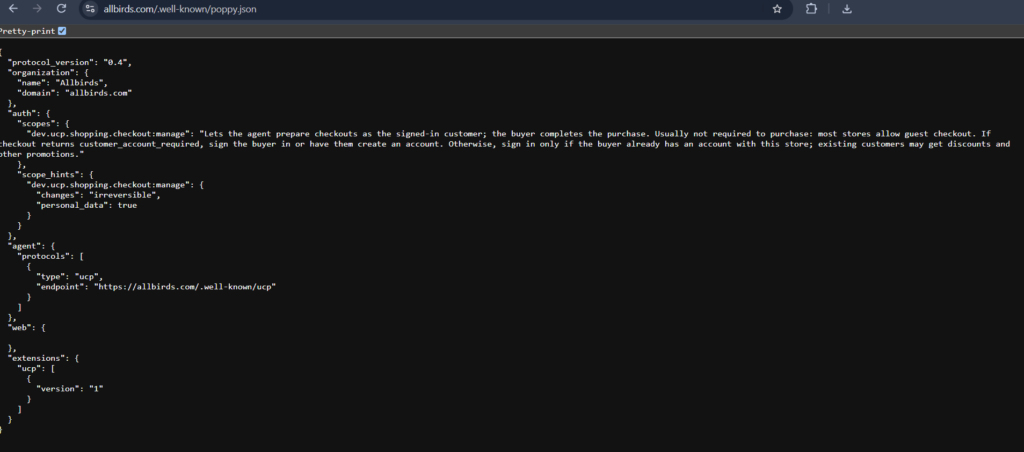
- protocol_version says “1.0”. Some live files still carry an earlier draft number: Allbirds, a Shopify store, served “0.4” when we checked on 20 November 2026. If yours does, ask whoever publishes it when it moves to 1.0.
- organization.domain is the exact domain in your address bar.
- There is at least one of web, apis or agent.
If all three pass, you have a front door. Whether agents can get through it is the next question.
The common failures
These are the mistakes most likely to stop an agent, mostly drawn from the 1.0 spec and from Stacktree’s notes on running it:
- The file lives only on an API host (such as api.example.com), so the main domain has none.
- organization.domain does not match the host that served the file.
- The file is served over plain HTTP, or redirects end somewhere other than /.well-known/poppy.json.
- auth is present, but the OAuth server metadata cannot be found at its standard address.
- The OAuth server’s protected_resources does not list your domain back.
- Several authorization servers are listed, but auth.issuer is missing.
- A bot wall or firewall rule blocks the agent before it ever reaches the file.
- API and scope descriptions are too vague for an agent to choose between them.
- supported_versions points to an older file that no longer loads.
- web.disabled is set, but no apis or agent is offered, so there is no way in at all.
The real test: does an agent get in?
A valid file only proves the sign is right. The full test follows it like an agent: read poppy.json, fetch the OAuth metadata, then open a signed-out session and see whether your site answers. The official validator does this against a test environment. For your live site, use a checker that reads without signing in or changing anything.
Ora’s Poppy grader is one such checker. It follows your file the way an agent would, sends at most six requests, and never signs in.
Shopify answered the Poppy question for its merchants overnight. Everyone else has to publish their own front door, then prove that a personal agent can actually walk through it.