What Is llms.txt, and Does It Actually Do Anything?


llms.txt is a small text file a website puts at its root (example.com/llms.txt), like robots.txt, that tells AI systems what the site offers and which pages to read. It suggests. It does not block or permit anything.
The llms.txt standard was proposed by Jeremy Howard in September 2024. The thinking behind it is simple. Web pages are built for people, full of menus, scripts and layout. An AI model does better with a short, clean index that says “this is who we are, and these are the pages worth reading.”
The standard asks for very little. Only one part is required:
- An H1 with the site or project name. This is the only mandatory line.
- A blockquote summary. One or two sentences on what the site is.
- Optional detail. Plain paragraphs or lists with more context.
- H2 sections of links. Each link written as [name](url), optionally followed by a colon and a short note.
- An “Optional” H2. Secondary links an agent can skip when it is short on context.
It also suggests publishing a clean Markdown copy of important pages at the same URL with .md added, so an agent can read the page without the HTML around it.
That is what it is. Whether anything reads it is a different question, and the answer is mostly no.
# Fernhill Coffee

> Fernhill Coffee is a small-batch coffee roaster in Portland, Oregon. We sell whole-bean and ground coffee online, ship across the US, and offer monthly subscriptions.

We roast to order on Mondays and Thursdays. Orders over $40 ship free.

## Shop

- [All coffees](https://www.fernhillcoffee.example/shop): Every coffee we currently roast, with tasting notes and prices
- [Subscriptions](https://www.fernhillcoffee.example/subscriptions): Monthly plans, how they work, and how to pause or cancel
- [Gift cards](https://www.fernhillcoffee.example/gift-cards): Digital gift cards from $25

## Help

- [Shipping and returns](https://www.fernhillcoffee.example/shipping): Delivery times, costs and our returns policy
- [Brewing guides](https://www.fernhillcoffee.example/brew): How to brew our coffee with a French press, pour-over or espresso machine

## Optional

- [Our story](https://www.fernhillcoffee.example/about): How the roastery started
- [Wholesale](https://www.fernhillcoffee.example/wholesale): Coffee for cafés and offices
Copy
That is the whole llms.txt file: a name, a one-sentence summary, a little context, then grouped links. Each link can carry a short note saying what is on the page. The “Optional” section holds pages an AI can skip if it is short on space. Writing one by hand takes about an hour, and SEO plugins such as All in One SEO can generate one automatically.
Writing it is the easy part. The question that matters is whether any AI system ever opens it.
The Evidence: 97% of llms.txt Files Are Never Requested
In June 2026, Ahrefs published the largest study of llms.txt traffic so far. It looked at server traffic for 137,210 domains during May 2026.
The headline numbers:
- 28% of those domains publish an llms.txt file, about 38,000 sites. Ahrefs notes its customers skew technical, so the real-world figure is likely lower.
- 97% of those files got zero requests in the whole month. No AI bots, no search crawlers, no humans.
- Only about 1,100 sites saw any traffic to the file at all.
The traffic that did arrive is just as telling. SEO audit tools made 21.7% of it. Named AI bots of every kind made 19.5% combined. The bots that fetch pages to answer a live question in an AI search tool made 1.1%.
In other words, the file is read mostly by the industry that sells advice about it.
Two more findings matter for anyone deciding whether to bother:
- AI bots never asked for a file that was not there. On sites without an llms.txt, there were no requests for one. AI systems are not checking for it the way crawlers check robots.txt.
- The most likely real readers are AI coding tools. Claude Code, a programming assistant, fetched the file more often than every AI search bot. That fits the original purpose: helping AI coding tools read software documentation.
Google has said the same thing in plain terms. On its Search Off the Record podcast, Google’s John Mueller argued that a file where every site describes itself cannot help an AI system choose which site to surface. He saw a narrow use once an agent is already on a site and trying to finish a task.
So adoption has run well ahead of evidence. If you were told to add llms.txt so ChatGPT or Google’s AI answers will find you, the data says it will not do that on its own.
What Actually Decides Whether an AI Can Use Your Site
An AI system can only cite or act on what it can reach, read and understand. Four things decide that, and none of them is llms.txt.
1. Your robots.txt lets AI crawlers in
llms.txt cannot permit or block anything. robots.txt can, and AI companies say their crawlers obey it.
Most run separate bots for separate jobs. OpenAI, for example, documents three: GPTBot for training, OAI-SearchBot for search, and ChatGPT-User for fetching a page a user asked about. Anthropic and Perplexity follow a similar pattern. Blocking a training bot is a reasonable choice. Blocking the search and user bots keeps you out of the answers.
Check your hosting or security service too. Some, Cloudflare among them, can block AI crawlers before they ever see your robots.txt.
2. Your pages carry structured data
Schema.org markup in JSON-LD states facts a machine would otherwise have to guess: a product’s price and stock status, an article’s author and publish date, your organization’s name and logo.
Unlike llms.txt, it sits on the page itself, tied to the content it describes. The ones that matter most are Product on product pages, Article on blog posts and Organization on the homepage. Most SEO plugins and store platforms can add them for you.
3. Your content shows up without JavaScript
This is the one most sites fail without knowing. A Vercel and MERJ study found that none of the major AI crawlers run JavaScript. That includes OpenAI’s bots, ClaudeBot and Meta’s crawler.
Google runs a page’s scripts before reading it. ChatGPT’s crawler does not. If your site loads products, prices or article text with JavaScript after the page opens, that crawler can see an empty page where your visitors see everything. This is common on sites built as JavaScript web apps. The fix is for your developer to have the server send the content as part of the page.
4. An agent can operate your pages
AI agents increasingly click, type and buy on a user’s behalf. Most of them work from the same structure a screen reader uses: what each element is and what it is called.
A button that is just an icon with no text label is a mystery to a screen reader. It is just as much of a mystery to an AI agent. Real buttons and links, labelled form fields and clear headings make a page usable by both. Accessibility work and AI readiness turn out to be largely the same work.
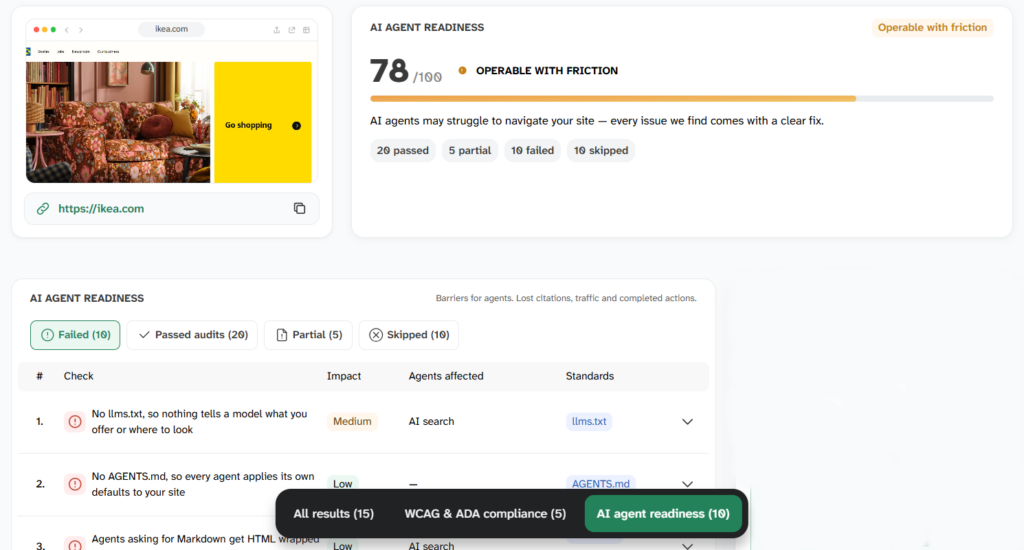
IKEA has no llms.txt at all. Our scan flags it as a medium-impact issue (“No llms.txt, so nothing tells a model what you offer”), and the site still scores 78 out of 100.
Now compare two sites that do have the file. Air Doctor’s llms.txt fails our check, and the site scores 86. HubSpot’s gets the same warning, marked only as partial, and it scores 85. The llms.txt result makes no visible difference to the score, because the checks that actually decide AI access are what move it.
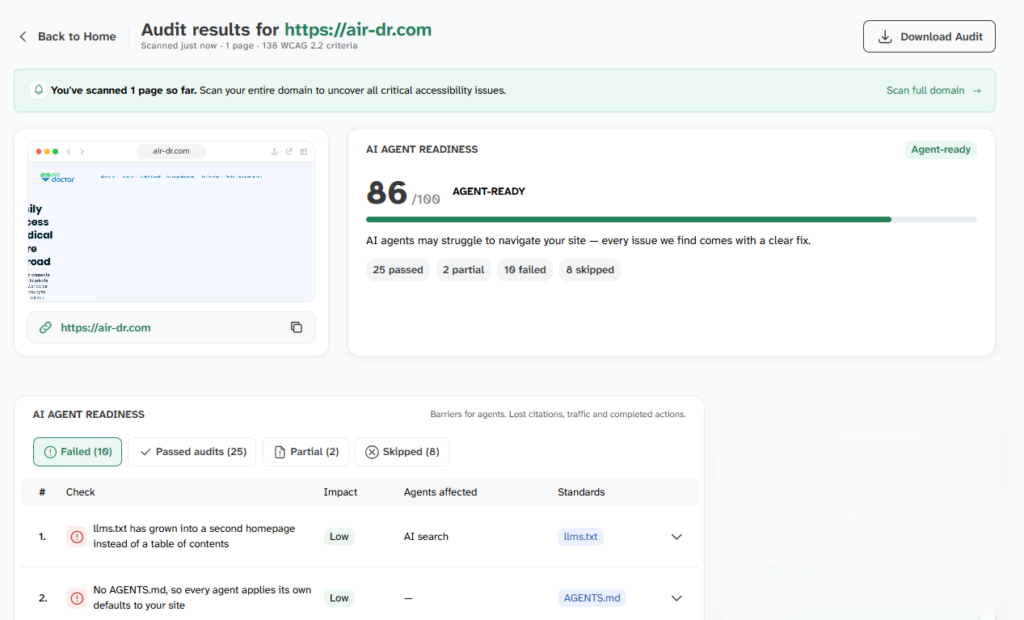
Air Doctor: llms.txt fails, rated low impact. Score 86, agent-ready.
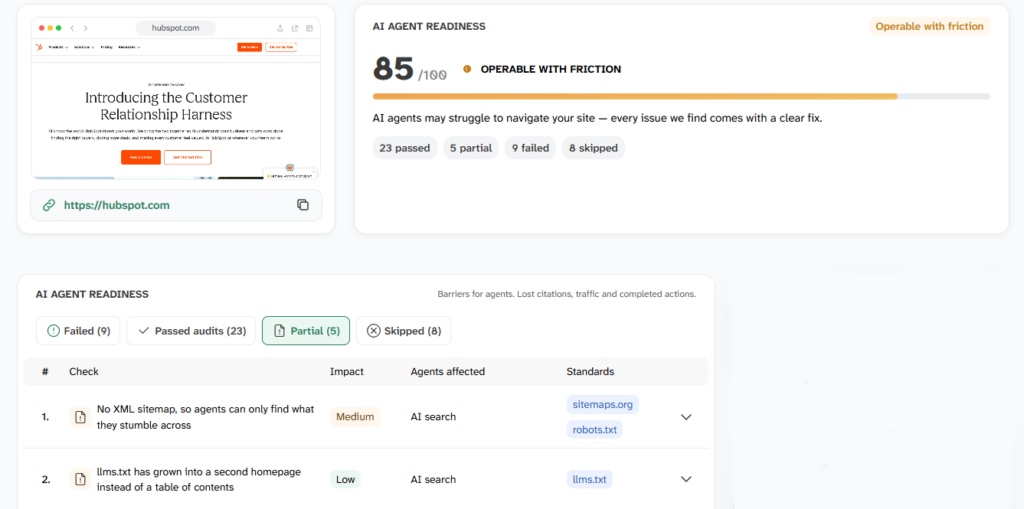
HubSpot: the same llms.txt warning, marked partial. Score 85.
If you keep an llms.txt anyway
It costs little, and AI coding tools do read it. Ahrefs suggests three precautions.
- Link to it from your site so AI tools can find it.
- Limit who can edit it and review changes, because anyone who can edit it can plant instructions for AI tools to read.
- And find out whether anything actually requests it before you spend more time on it.
A 15-Minute Checklist You Can Run Yourself
- Read your robots.txt. Open yoursite.com/robots.txt in your browser. Look for GPTBot, OAI-SearchBot, ChatGPT-User, ClaudeBot, Claude-SearchBot and PerplexityBot. A Disallow: / under one of those names shuts that bot out. A Disallow: / under User-agent: * shuts out every bot.
- Check your hosting or security settings. Look for an “AI bots” or “AI crawlers” setting, in Cloudflare for example, and make sure it matches what you want.
- Check that your key pages work without JavaScript. Open a product page or article, press Ctrl+U (Cmd+Option+U on a Mac) to view the page source, then search it for a sentence or a price from the page. If you can’t find it, AI crawlers can’t see it either.
- Test your structured data. Paste a product page and a blog post into Google’s Rich Results Test. No results, or errors, means there is work to do.
- Use your site with the keyboard only. Press Tab to move through sign-up, search or checkout. If you get stuck or lose track of where you are, an AI agent will struggle too.
- Ask whether anything reads your llms.txt. Your developer or hosting dashboard can show whether any bot has requested it. If nothing has, don’t spend more time on it.
- If you keep one, keep it tidy. A name, a one-line summary, and links only to your own important pages.
Our free checker tests everything in this article, llms.txt included, as part of 45 checks in one scan.