

100 eCommerce Giants, One Big Problem: Our 2025 Accessibility Test Results


This study analyzes cart and checkout accessibility across leading eCommerce sites using data collected throughout 2025 and is published in January 2026.
Cart abandonment has long been, and still continues to be, one of the most persistent challenges in the online retail space.
Even with the checkout process being one of the most important moments in the user journey and despite major investments in UX design and conversion optimization, it seems that cart pages often remain a weak link.
A successful checkout process all comes down to user experience, and a lack of accessibility can have a major impact on this.
So, with this in mind, we decided to pursue our questions about cart abandonment a little further using tools like Similarweb’s extension.
Our main aim for this study was to evaluate the accessibility of cart pages across 100 of today’s leading eCommerce sites in 2025, with a particular focus on the practical, on-page barriers customers may encounter.
Our Approach to This Study
We created a shortlist of high-traffic retail domains based on global ranking data and category relevance, ensuring the sample reflected a broad cross-section of today’s largest and most active eCommerce platforms.
The next step was to process each of these pages through the AccessibilityChecker.org automated scanner to start collecting our data.
Each site followed the same auditing process:
- Identifying the primary cart or checkout URL
- Submitting each page to the AccessibilityChecker.org scanner
- Running a full automated audit against WCAG and best-practice criteria
- Logging compliance scores, issue types, and affected elements
- Grouping findings by severity and frequency
- Comparing WCAG failures against best-practice usability concerns
For consistency, a “cart page” was defined as any page where users review items prior to purchase or one where they begin the checkout process. This includes shopping cart summaries, checkout start pages, and billing or delivery steps where applicable.
Why Only 84 Pages Were Successfully Scanned
Following our auditing process, we ended up with a list of 84 cart and checkout pages that could be successfully scanned across which we gathered the following data:
- Average page compliance scores
- Total number of critical WCAG and best-practice issues
- Overview of the most common WCAG and best-practice issues
- Percentage of URLs impacted by the most common issues
- Percentage of failing elements linked to the most common issues
The remaining 16 URLs could not be scanned due to technical limitations, including dynamically generated content, bot-blocking measures, and security configurations that prevented the scanner from accessing page elements.
As a result, these pages were excluded to ensure accuracy and consistency across the dataset.
WCAG vs. Best Practice Issues
While WCAG violations represent clear regulatory non-compliance, not every usability problem on a cart page breaks the rules.
WCAG issues are failures to meet the formal accessibility standards required for legal compliance, and they pose both regulatory and litigation risk.
Best-practice issues, on the other hand, may not violate WCAG but can still create friction, confusion, or unnecessary effort for users, especially those who rely on assistive technologies.
Both matter, but for different reasons: WCAG is about meeting the legal baseline, and best practice is about delivering an inclusive, seamless user experience.
A Quick Summary of Our Findings
eCommerce Sites: A Prime Target for Web Accessibility Lawsuits
Before we dive into the specific results of this study, it’s worth taking a look at why accessibility needs to be a primary consideration for eCommerce site owners beyond simple customer satisfaction and sales.
According to a 2025 Midyear Digital Accessibility Lawsuit Report, we may see as many as 5,000 web accessibility lawsuits by the end of 2025, which is a 16% jump from last year.
And if we look at the lawsuits from 2024, eCommerce sites accounted for 77% of them.
Other industry research also supports this broader risk picture. A recent eCommerce report from accessiBe highlighted that checkout experiences often fail users in multiple ways, and while accessibility is a big part of the puzzle, it’s clear that friction in checkout flows continues to be a widespread issue.
Large eCommerce sites see enormous volumes of traffic and serve broad customer bases, so any barrier to accessibility not only affects countless users, but also attracts more attention.
Legal frameworks like the ADA, EAA, and AODA require any businesses offering goods or services to the public to ensure their digital interfaces are accessible, and consumers are far more aware of these requirements than ever before.
The reality is, cart/checkout pages are essential to revenue, and companies that are targeted by lawsuits may face not only legal costs but also reputational damage, lost sales, and regulatory scrutiny.
If you manage an eCommerce website, no matter how simple or complex your check-out process is, your customers are paying attention, particularly those who rely on assistive technology.
The Findings
Overall Compliance Scores
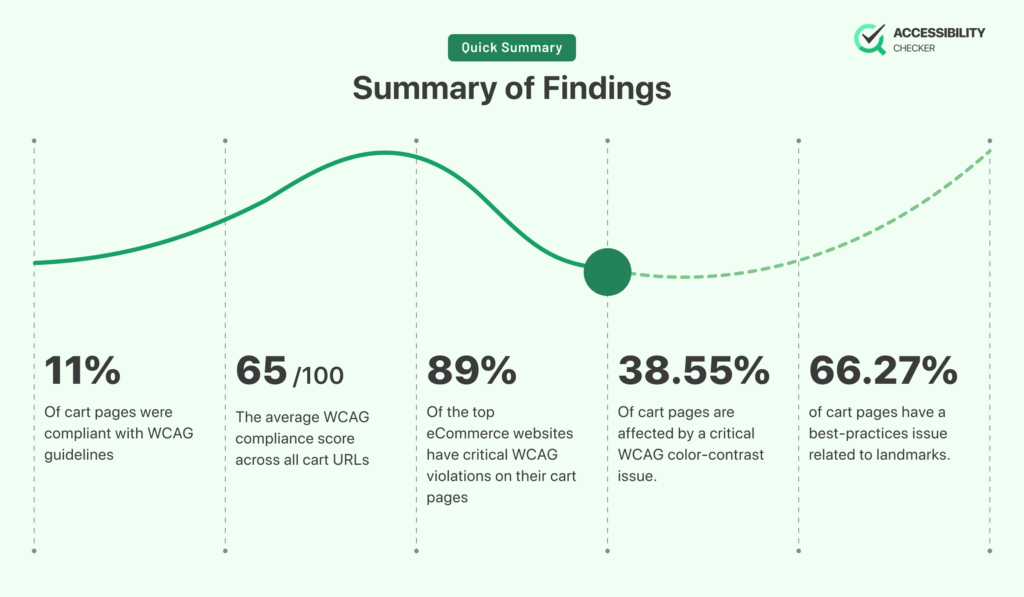
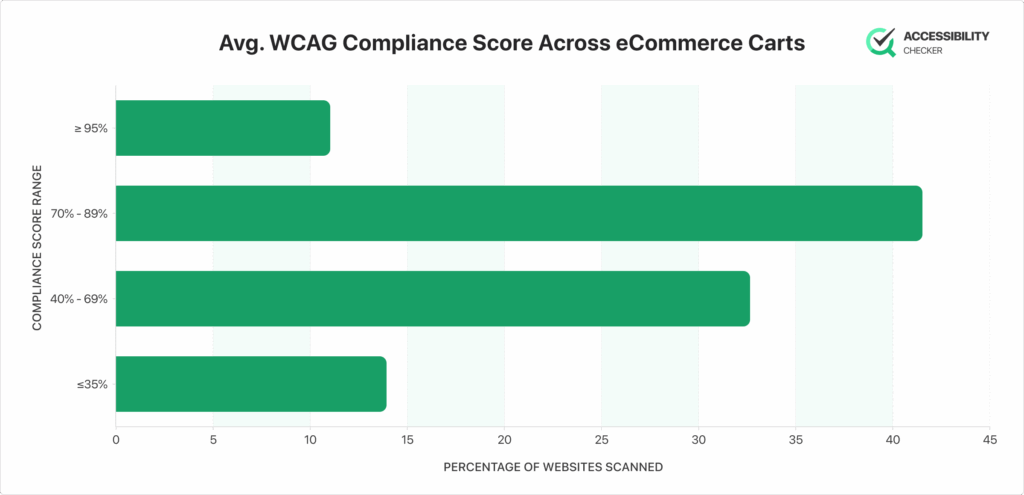
Out of the 84 cart and checkout URLs that were scanned, only 11% were compliant with WCAG guidelines, with brands like Apple, Lego, and Dell being among them.
Of the bigger eCommerce brands, Alibaba’s cart pages came in with the lowest score of just 23/100.
The average score among all carts is just 65/100, so there is still a lot of room for improvement.
The Most Common Critical WCAG Issues
Out of the top eCommerce sites in the US, 89% had critical WCAG violations on their cart pages.
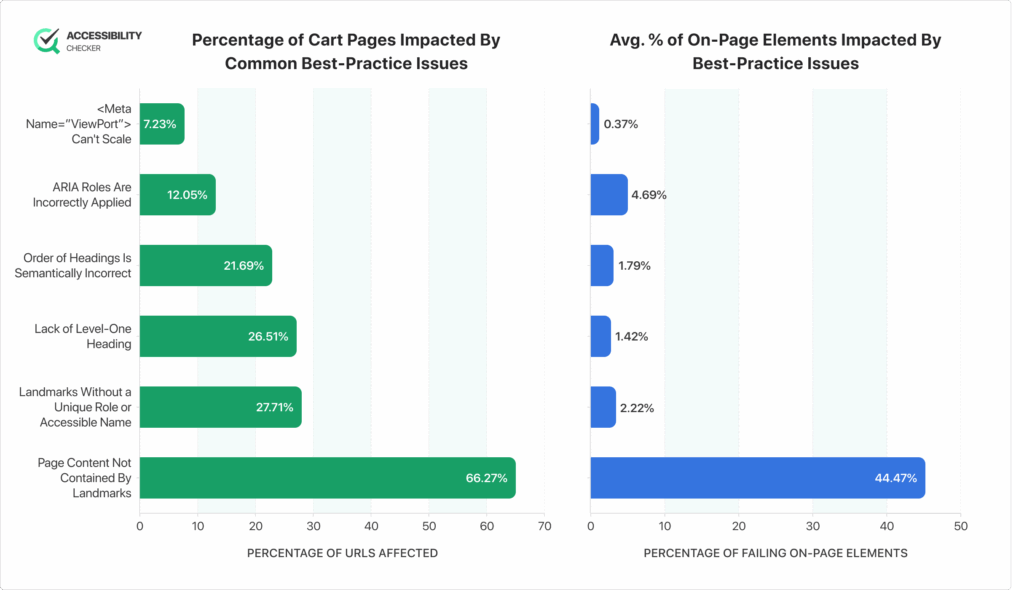
Let’s take a closer look at some of the most common critical WCAG issues.
Ensure the Contrast Between Foreground and Background Colors Meets WCAG 2 AA Minimum Contrast Ratio Thresholds
Percentage of URLs Affected: 38.55%
Percentage of Failing On-Page Elements: 19.27%
Adequate color contrast ensures that text, prices, error messages, and important CTAs, such as “Proceed to Checkout”, are readable for users with low vision or color-vision deficiencies.
Shoppers generally need to confirm product details, totals, and actions on a cart page, but poor contrast can lead to missed information or mistakes during checkout, resulting in abandonment or general frustration.
Ensure Links Have Discernible Text
Percentage of URLs Affected: 18.07%
Percentage of Failing On-Page Elements: 2.22%
Links with clear, descriptive text are vital for shoppers who rely on screen readers or keyboard navigation.
On a cart page, ambiguous links such as “click here” or icons without labels can make it difficult for users to understand how to modify the cart, view product details, or continue shopping.
Ensure Buttons Have Accessible Names
Percentage of URLs Affected: 16.87%
Percentage of Failing On-Page Elements: 2.66%
Buttons must communicate their purpose programmatically, and not just visually.
When buttons like “Remove,” “Update Quantity,” or “Checkout” don’t have accessible names, assistive technologies can’t convey their function accurately, so some users will be blocked from completing their purchase.
Ensure <Img> Elements Have Alternate Text or a Role of Non or Presentation
Percentage of URLs Affected: 16.87%
Percentage of Failing On-Page Elements: 1.85%
Any images that are included on a checkout page must either have meaningful alt text or be marked as decorative.
Without proper alt attributes, screen readers may skip crucial product information or read out unnecessary noise from decorative elements.
Ensure Interactive Controls Are Not Nested
Percentage of URLs Affected: 12.05%
Percentage of Failing On-Page Elements: 3.21%
Nested interactive elements create ambiguity in keyboard focus and assistive-technology behavior.
When dynamic components are improperly nested, it can make controls unusable or unpredictable, leading to a frustrating check-out process.
Ensure <Meta Name=”Viewport” Does Not Disable Text Scaling and Zooming
Percentage of URLs Affected: 12.05%
Percentage of Failing On-Page Elements: 0.62%
Restricting text scaling or zooming prevents users, especially those with low vision, from enlarging content to a readable size.
On a cart page, where shoppers must review item details, prices, totals, and policies, the inability to zoom can make content inaccessible.
Most Common Best-Practice Issues
WCAG best-practice guidelines aren’t legally required because they go beyond the minimum standards needed for compliance.
However, they are still strongly recommended because they improve usability for all users, and help create a more seamless and inclusive experience, even when no formal violation exists.
Ensure All Page Content Is Contained By Landmarks
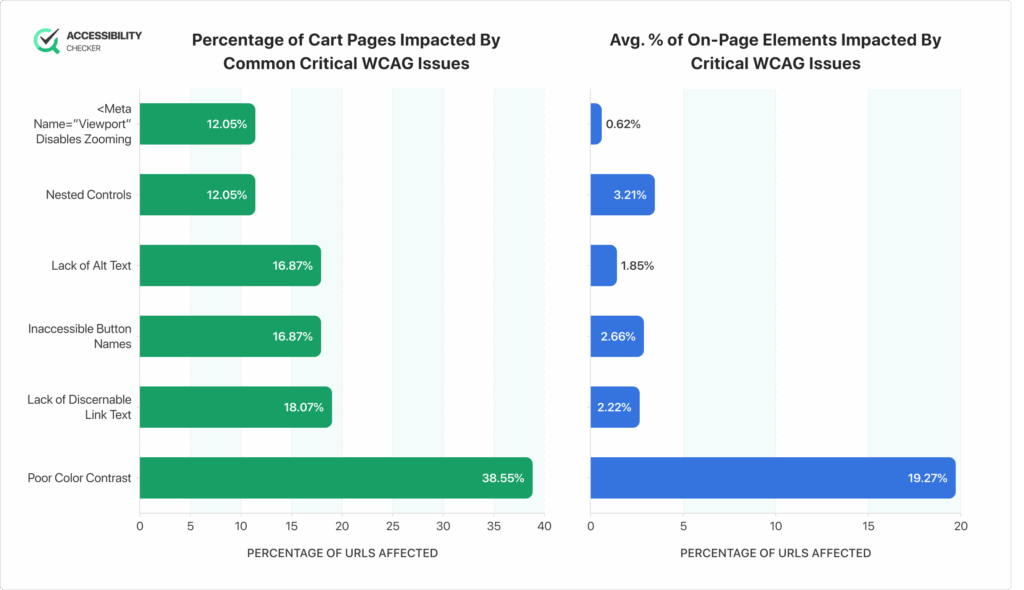
Percentage of URLs Affected: 66.27%
Percentage of Failing On-Page Elements: 44.47%
Using proper landmark regions helps assistive-technology users understand the structure of a checkout page and quickly navigate to key areas.
Landmarks ensure shoppers can jump between sections like the cart summary, form fields, and totals without losing their place. This minimizes confusion and supports a smoother checkout experience.
Landmarks Should Have a Unique Role or Role/Label/Title Combination
Percentage of URLs Affected: 27.71%
Percentage of Failing On-Page Elements: 2.22%
When landmarks share the same role without unique labels, screen readers cannot distinguish between them.
On a checkout page that may include multiple forms or grouped sections (shipping, billing, payment), unique landmark labels are essential because they allow users to identify and navigate to the right section quickly.
Ensure That the Page, Or at Least One of Its Frames, Contains a Level-One Heading
Percentage of URLs Affected: 26.51%
Percentage of Failing On-Page Elements: 1.42%
A clear, single H1 provides users with an anchor point and helps screen readers announce the main purpose of the page.
For cart and checkout experiences, an H1 like “Your Cart” or “Checkout” reassures users they are in the right place and aligns with their expectations.
Ensure the Order of Headings Is Semantically Correct
Percentage of URLs Affected: 21.69%
Percentage of Failing On-Page Elements: 1.79%
Correct heading hierarchy (H1 → H2 → H3…) is a must for helping shoppers scan and navigate the content on a cart page, which usually has multiple sections. A proper heading order basically allows users to move efficiently through complex information without feeling overwhelmed.
Ensure ARIA Roles Are Correctly Applied
Percentage of URLs Affected: 12.05%
Percentage of Failing On-Page Elements: 4.69%
ARIA roles help define how elements behave for assistive technologies, but misused roles can create confusion or malfunctioning controls.
In cart and checkout flows, incorrect ARIA roles on buttons, forms, or alerts (like promo errors) can prevent users from completing important actions.
Ensure <Meta Name=”ViewPort”> Can Scale a Significant Amount
Percentage of URLs Affected: 7.23%
Percentage of Failing On-Page Elements: 0.37%
Allowing meaningful zoom and scaling ensures shoppers with low vision can enlarge text, totals, and form fields to a readable size.
Cart and checkout pages tend to contain dense, information-heavy content, and users must be able to verify pricing, quantities, and input fields accurately.
A Quick Disclaimer
*It’s almost impossible to be 100% certain of the results.
**Many factors can affect the results of a study, including the sample size, the method of data collection, and the way the data is analyzed.
***Even if a study is well-designed and well-executed, there is always the possibility that the results could be more accurate. For example, larger sample sizes and studies conducted over years instead of months.
Disclaimer: This research is independent.
What Are the Next Steps for eCommerce Websites?
Improving accessibility on your eCommerce site requires a combination of ongoing evaluation, structured processes, and responsible development practices.
While meeting WCAG standards is the foundational requirement, maintaining an accessible user experience will need you to take a proactive, multi-layered approach.
- Start With An Automated Accessibility Audit. AccessiblityChecker.org provides a fast, scalable way to identify common accessibility issues and is designed to be used early and often, particularly after adding new features or making design updates.
- Follow Up With Manual Accessibility Testing. Manual checks ensure you’re moving through the check-out process in the same way a user would, including those who rely on assistive technology. Our tool will provide you with an exact list of what to check.
- Build Accessibility Into the Development Workflow. Accessibility will never be a one-time effort. Integrating accessibility checks into your design systems, component libraries, code reviews, and QA processes ensures your team doesn’t unintentionally reintroduce issues.
- Provide Ongoing Training for Designers and Developers. Teams often create inaccessible components unintentionally due to gaps in understanding, but regular training can reduce this risk. It also empowers teams to design with accessibility in mind from the start.
- Monitor Accessibility Over Time. As your site evolves, and new guidelines and technologies are introduced, accessibility can degrade. Regular scheduled audits ensure long-term compliance and help you maintain a smooth, inclusive checkout experience.