
ACE™ Engine — Proprietary Accessibility Compliance Engine
The engine behind every scan, every score, and every fix. ACE Engine is a versioned, documented accessibility testing engine with 100+ proprietary rules and the ACE Impact Classification system.





























What Is ACE Engine?
ACE™ Engine is an accessibility compliance engine that combines comprehensive accessibility scanning with proprietary enhancements in issue detection, remediation, and compliance documentation. It goes deeper than standard accessibility scanning by catching issues that take time to load, require user interaction to reveal, or slip through conventional checks.
Beyond detection, it powers the remediation workflow—understanding context, suggesting fixes, and intelligently applying them without modifying source files. It also automatically generates VPATs for each site, turning accessibility data into compliance documentation.
ACE Rule ID System
The engine contains over 100 accessibility rules derived from WCAG 2.2, ADA, Section 508, EAA, and EN 301 549 standards. Every rule assigns a unique, proprietary Rule ID to every accessibility rule. Rule IDs follow a descriptive naming convention: a category prefix followed by a specific identifier. This makes rules immediately understandable, searchable, and easy to reference in bug reports, remediation tickets, and documentation.
Example Rule IDs:
| Rule ID | What It Tests |
|---|---|
ace-img-area-alt |
Confirm clickable regions in image maps include descriptive alternative text for screen readers |
ace-aria-allowed-attr |
Check that ARIA attributes applied to an element are compatible with its assigned role |
ace-aria-braille-equiv |
Confirm that braille-specific ARIA labels have corresponding non-braille text equivalents |
ace-aria-command-name |
Validate that interactive ARIA elements like buttons and links have accessible names |
ace-aria-cond-attr |
Verify that ARIA attributes are applied according to the specification requirements for the element\'s role |
ace-aria-deprecated-role |
Flag elements using ARIA roles that have been deprecated in the current specification |
ace-aria-hidden-body |
Detect when the document body is marked aria-hidden, hiding content from assistive technologies |
ace-aria-hidden-focus |
Identify focusable elements inside aria-hidden containers that confuse screen reader users |
ace-aria-input-name |
Confirm ARIA-based input fields like textbox and combobox have accessible names |
ace-aria-meter-name |
Check that the meter elements using ARIA roles have a descriptive accessible name |
Rule IDs are stable — once assigned, they never change. A complete, publicly available ACE Rule Reference documents every Rule ID, what it tests, which WCAG success criterion it maps to, and detailed remediation guidance.
ACE Impact Classification
Beyond rule identification, ACE Engine applies a proprietary classification system called ACE Impact Classification that categorizes every issue into one of three tiers: Legal Risk, User Impact, or Best Practice. This classification sits alongside standard WCAG conformance levels (A, AA, AAA), giving organizations both the technical standard and practical prioritization guidance.
| Classification | Definition |
|---|---|
| Legal Risk | Issues that create direct legal and compliance exposure. Examples: keyboard traps, missing form labels (ace-form-label), images without alt text (ace-img-alt-text), missing skip links (ace-nav-bypass-block). |
| User Impact | Issues that significantly impair usability for people with disabilities. Examples: poor color contrast (ace-text-contrast-aaa), unclear link text (ace-nav-link-name), missing focus indicators (ace-aria-hidden-focus). |
| Best Practice | Enhancements that improve accessibility quality beyond strict compliance. Examples: optimized ARIA labels (ace-aria-prohibited-attr), semantic markup improvements, redundant label removal. |
Using both WCAG conformance level and ACE Impact Classification, teams fix what matters most first — starting with Legal Risk, then User Impact, then Best Practice.
ACE Score — One Number, Full Picture
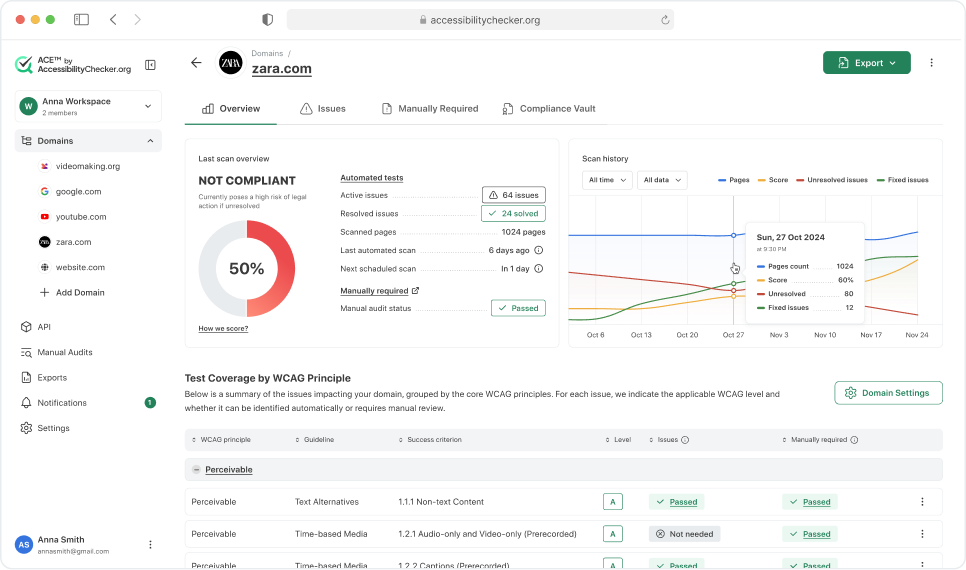
Every page and site scanned receives an ACE Score, a single number representing overall accessibility compliance. Legal Risk issues have the highest impact on the score, User Impact issues have moderate impact, and Best Practice issues have minimal impact.
The score also factors in manual required procedures, tests that cannot be fully automated and require human verification, such as logical reading order, meaningful content structure, and cognitive accessibility. For sites using the ACE Chrome Extension, the score incorporates issues found on interactive elements like tabs, modals, multi-stage forms, and dynamically loaded content that standard automated scans can miss.
Domains that achieve a score of 100 are eligible to receive an official accessibility certification from ACE by AccessibilityChecker.org, a verified recognition that the site meets full compliance standards. The ACE Score gives teams a complete snapshot of their accessibility posture while the underlying rule data guides detailed remediation.
Who Uses ACE Engine?
ACE Engine is available as a standalone API or as part of the full ACE Platform by AccessibilityChecker.org.
ACE Engine in the Platform
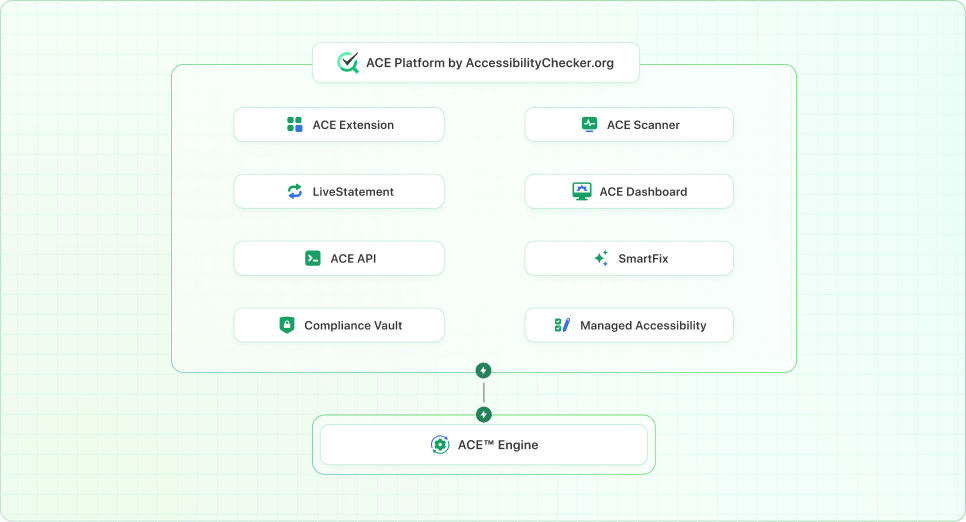
ACE Engine is the unified core of the AccessibilityChecker.org Platform:
Every product uses the same ACE Rule IDs, Impact Classification, and ACE Score — ensuring consistency from detection through remediation and reporting.
Version History & Changelog
ACE Engine is continuously improved with new rules, better detection accuracy, and expanded platform capabilities. Every version documents what was changed so users understand how updates affect their scan results.
- Redesigned VPAT generation mechanism for clearer compliance status
- Updated sitemap error handling
- Continued engine accuracy improvements and bug fixes
- AI-powered fix suggestions (SmartFix) for automated remediation
- AI analyzes ACE Rule IDs and Impact Classification to recommend prioritized fixes
- Resolved AI-Fix functionality bug affecting landmark rule suggestions
- Bulk Scan API grouping improvements for enterprise customers
- Updated dashboard tooltips including new error handling explanations
- Color contrast issue display improvements at page level
- Resolved mPDF tagging issues for better PDF accessibility compliance
- Severity-based filtering now available across all dashboard views
- Chrome extension for live scanning of pages with tabs, multi-stage forms, filters, and dynamic content
- Manual audit guidance integrated directly into the extension
- Severity level column added to by-issue breakdown and page-level drilldowns
- Issues severity filtering in dashboard views
- Reordered manual required tests to prioritize most relevant tests
- Fixed WCAG success criteria mappings across multiple rules
- Resolved Active Issues dashboard errors for Screen Reader and Technology Tests
- Dashboard navigation improvements (back button, breadcrumbs)
- Removed issue grouping that caused confusion in scan results
- Color contrast algorithm updated with additional decimal precision for more accurate ratio calculations
- Actual color identification: detected colors now displayed alongside contrast issues
- Color contrast checker tool improvements for clearer reporting
- REST API endpoints for programmatic website scanning
- Bulk Scans API enabling batch processing of multiple domains
- Bulk Scans app interface for visual access to batch scanning results
- API-based domain grouping for organizing scan results
- Password-protected pages prompt added to dashboard onboarding
- Overhauled PDF export: full URLs (not just domains), dynamic compliance flags, customizable branding
- Fixed PDF audit report to match free and paid scan feature sets
- PDF file naming now includes website name and scan date
- Resolved detection discrepancies between ACE Engine and Lighthouse results
- WCAG level changes now immediately update ACE Score and issue counts
- Manual audit coverage aligned with PDF export output
- Full WCAG 2.2 rule coverage with 150+ proprietary rules
- Introduced ACE Impact Classification system (Legal Risk, User Impact, Best Practice)
- Introduced ACE Rule ID naming convention across all rules
- Mobile and tablet viewport scanning (previously desktop-only)
- Redesigned checker interface with by-issue and by-page breakdowns
- Manual Required Audits 2.0 with improved guidance and categorization
- Improved sitemap.xml processing logic for more reliable site crawling
- Site-wide recommendations for identifying accessibility patterns across domains
- Custom headers support for scanning authenticated and password-protected pages
Frequently Asked Questions
All ACE Rule IDs
103| ACE Rule ID | Title | Impact Level | |
|---|---|---|---|
ace-img-area-alt |
Confirm clickable regions in image maps include descriptive alternative text for screen readers | Legal Risk | Read more |
ace-aria-allowed-attr |
Check that ARIA attributes applied to an element are compatible with its assigned role | Legal Risk | Read more |
ace-aria-braille-equiv |
Confirm that braille-specific ARIA labels have corresponding non-braille text equivalents | User Impact | Read more |
ace-aria-command-name |
Validate that interactive ARIA elements like buttons and links have accessible names | Legal Risk | Read more |
ace-aria-cond-attr |
Verify that ARIA attributes are applied according to the specification requirements for the element\'s role | User Impact | Read more |
ace-aria-deprecated-role |
Flag elements using ARIA roles that have been deprecated in the current specification | Best Practice | Read more |
ace-aria-hidden-body |
Detect when the document body is marked aria-hidden, hiding content from assistive technologies | Legal Risk | Read more |
ace-aria-hidden-focus |
Identify focusable elements inside aria-hidden containers that confuse screen reader users | User Impact | Read more |
ace-aria-input-name |
Confirm ARIA-based input fields like textbox and combobox have accessible names | Legal Risk | Read more |
ace-aria-meter-name |
Check that the meter elements using ARIA roles have a descriptive accessible name | Legal Risk | Read more |
ace-aria-progressbar-name |
Check that the progress indicators using ARIA roles have a descriptive accessible name | Legal Risk | Read more |
ace-aria-prohibited-attr |
Identify the ARIA attributes that conflict with an element\'s assigned role per the specification | User Impact | Read more |
ace-aria-required-attr |
Confirm the elements with ARIA roles include all mandatory ARIA attributes for that role | Legal Risk | Read more |
ace-aria-required-children |
Confirm the container elements with ARIA roles include the required child role elements | Legal Risk | Read more |
ace-aria-required-parent |
Confirm the child elements with ARIA roles are nested within the required parent role containers | Legal Risk | Read more |
ace-aria-valid-roles |
Validate that all the role attribute values correspond to defined WAI-ARIA roles | Legal Risk | Read more |
ace-aria-toggle-name |
Check that ARIA toggle controls like checkbox and switch have accessible names | Legal Risk | Read more |
ace-aria-tooltip-name |
Verify that the tooltip elements implemented with ARIA have descriptive accessible names | User Impact | Read more |
ace-aria-valid-value |
Confirm all ARIA attribute values conform to the allowed value types defined in the specification | Legal Risk | Read more |
ace-aria-valid-attr |
Confirm attributes prefixed with aria- are recognized and are valid according to the WAI-ARIA specification | Legal Risk | Read more |
ace-text-no-blink |
Detect the usage of the deprecated blink element is inaccessible to many users | Legal Risk | Read more |
ace-form-button-name |
Verify all button elements have accessible text content for assistive technologies | Legal Risk | Read more |
ace-nav-bypass-block |
Check pages provide skip links or landmarks to bypass repeated navigation blocks | Legal Risk | Read more |
ace-text-contrast-aa |
Evaluate text and background color combinations meet the 4.5:1 AA contrast ratio | Legal Risk | Read more |
ace-struct-def-list |
Validate definition list (dl) elements contain only properly structured dt and dd pairs | User Impact | Read more |
ace-struct-dl-item |
Confirm definition terms (dt) and descriptions (dd) are nested within a dl container | User Impact | Read more |
ace-meta-doc-title |
Check that HTML document includes a non-empty title element to identify the page purpose | Legal Risk | Read more |
ace-aria-unique-id |
Identify the duplicate ID values that are referenced by ARIA attributes or label associations | Legal Risk | Read more |
ace-form-multi-label |
Detect form controls with multiple associated label elements, which can cause inconsistent screen reader behavior | User Impact | Read more |
ace-nav-frame-focusable |
Confirm embedded frames with focusable content are not removed from tab order | User Impact | Read more |
ace-struct-frame-unique-title |
Check that each iframe and frame element has a unique descriptive title | User Impact | Read more |
ace-struct-frame-title |
Verify that iframe and frame elements have an accessible name via the title attribute | Legal Risk | Read more |
ace-meta-lang-present |
Confirm the HTML element includes a lang attribute for assistive technology support | Legal Risk | Read more |
ace-meta-lang-valid |
Validate the lang attribute on the HTML element is a recognized BCP 47 tag | Legal Risk | Read more |
ace-meta-lang-mismatch |
Check that lang and xml:lang attributes on the HTML element specify the same base language | User Impact | Read more |
ace-img-alt-text |
Verify images have alternative text or are explicitly marked as decorative | Legal Risk | Read more |
ace-form-input-button-name |
Confirm that submit, reset, and button-type input elements have discernible text labels | Legal Risk | Read more |
ace-form-input-image-alt |
Check that image-type input elements include descriptive alternative text | Legal Risk | Read more |
ace-form-label |
Verify that every form control has an associated visible label that is programmatically linked | Legal Risk | Read more |
ace-text-link-distinguish |
Check that hyperlinks within text blocks are visually distinguishable by more than just color | Legal Risk | Read more |
ace-nav-link-name |
Confirm that all hyperlink elements have meaningful, discernible text content | Legal Risk | Read more |
ace-struct-list-valid |
Validate list elements (ul, ol) contain only permitted child elements like li | User Impact | Read more |
ace-struct-listitem-parent |
Confirm that list item (li) elements are contained within an appropriate list parent element | User Impact | Read more |
ace-text-no-marquee |
Detect usage of the deprecated marquee element which creates inaccessible moving content | Legal Risk | Read more |
ace-meta-no-refresh |
Identify pages using meta refresh for timed redirects that disorient users | Legal Risk | Read more |
ace-meta-viewport-scale |
Check the viewport meta tag does not disable user scaling or limit zoom | Legal Risk | Read more |
ace-nav-no-nested-interactive |
Identify interactive controls nested inside other interactive elements, which creates keyboard navigation and announcement issues | User Impact | Read more |
ace-media-no-autoplay |
Detect auto-playing media with audio over 3 seconds lacking pause controls | User Impact | Read more |
ace-media-object-alt |
Verify that embedded object elements include descriptive alternative text | Legal Risk | Read more |
ace-img-role-alt |
Check that elements assigned role="img" have appropriate alternative text | Legal Risk | Read more |
ace-nav-scroll-focusable |
Confirm that scrollable content areas can be reached and navigated using keyboard controls | User Impact | Read more |
ace-form-select-name |
Verify that select dropdown elements have an accessible name through labels or ARIA attributes | Legal Risk | Read more |
ace-img-no-server-map |
Flag server-side image maps which cannot provide text alternatives for clickable regions | Legal Risk | Read more |
ace-img-svg-alt |
Check that SVG elements used as images have appropriate accessible text through title or aria-label | Legal Risk | Read more |
ace-table-td-headers |
Validate that table cell headers attributes reference valid cells within the same table | User Impact | Read more |
ace-table-th-data-cells |
Confirm that table header cells are associated with data cells they describe | User Impact | Read more |
ace-meta-valid-lang |
Validate that lang attribute values used within the page are recognized BCP 47 language tags | Legal Risk | Read more |
ace-media-video-caption |
Check that video elements include synchronized captions for deaf and hard-of-hearing users | Legal Risk | Read more |
ace-form-autocomplete-valid |
Validate autocomplete attribute values are appropriate for the form field type | Legal Risk | Read more |
ace-text-no-inline-spacing |
Check that text spacing applied through inline styles can be overridden by user-defined stylesheets | Legal Risk | Read more |
ace-nav-target-size |
Evaluate whether interactive touch targets meet the minimum size and spacing requirements for motor accessibility | Legal Risk | Read more |
ace-nav-unique-accesskeys |
Ensure every accesskey attribute value is unique | Best Practice | Read more |
ace-aria-allowed-role |
Validate that assigned ARIA roles are appropriate and permitted for the given HTML element type | Best Practice | Read more |
ace-aria-dialog-name |
Confirm that dialog and alertdialog elements have descriptive accessible names | Best Practice | Read more |
ace-aria-text-no-focus |
Validate that elements with role="text" do not contain focusable descendant elements | Best Practice | Read more |
ace-aria-treeitem-name |
Check that tree view item elements have descriptive accessible names | Best Practice | Read more |
ace-struct-no-empty-heading |
Detect heading elements that contain no visible or programmatic text content | Best Practice | Read more |
ace-table-no-empty-header |
Identify table header cells (th) that are empty and lack descriptive text | Best Practice | Read more |
ace-struct-frame-tested |
Verify that all frames and iframes are tested for accessibility compliance | Best Practice | Read more |
ace-struct-heading-order |
Check that heading levels follow a logical hierarchical sequence without skipping levels | Best Practice | Read more |
ace-img-no-redundant-alt |
Identify images whose alternative text duplicates adjacent visible text content | Best Practice | Read more |
ace-form-label-visible |
Flag form controls relying solely on title or aria-describedby instead of visible labels | User Impact | Read more |
ace-landmark-banner-top |
Confirm the banner landmark region is at the top level of document structure | Best Practice | Read more |
ace-landmark-complementary-top |
Confirm that complementary landmark regions (aside) are positioned at the top level | Best Practice | Read more |
ace-landmark-contentinfo-top |
Confirm that the contentinfo landmark region is positioned at the top level of the document | Best Practice | Read more |
ace-landmark-main-top |
Confirm the main landmark region is at the top level of document structure | Best Practice | Read more |
ace-landmark-single-banner |
Check that the page contains no more than one banner landmark region | Best Practice | Read more |
ace-landmark-single-contentinfo |
Check that the page contains no more than one contentinfo landmark region | Best Practice | Read more |
ace-landmark-single-main |
Check that the page contains no more than one main landmark region | Best Practice | Read more |
ace-landmark-unique-label |
Check that landmark regions have unique accessible names to help users distinguish between them | Best Practice | Read more |
ace-meta-viewport-zoom |
Recommend the viewport meta tag allows scaling up to at least 500% | Best Practice | Read more |
ace-struct-has-h1 |
Check that the page includes at least one level-one heading to establish content hierarchy | Best Practice | Read more |
ace-aria-presentation-conflict |
Identify decorative elements with conflicting global ARIA attributes or tabindex values | Best Practice | Read more |
ace-landmark-all-content |
Check all visible page content is within defined landmark regions for navigation | Best Practice | Read more |
ace-table-scope-valid |
Validate scope attributes on table header cells use valid values like row or col | Best Practice | Read more |
ace-nav-skip-link |
Verify that skip navigation links point to focusable targets within the page | Best Practice | Read more |
ace-nav-no-positive-tabindex |
Flag elements with tabindex values greater than 0, which disrupt natural keyboard navigation order | User Impact | Read more |
ace-table-unique-name |
Detect tables where the caption text duplicates the summary attribute content | Best Practice | Read more |
ace-text-contrast-aaa |
Evaluate text and background color combinations meet the 7:1 AAA contrast ratio | User Impact | Read more |
ace-nav-identical-link-purpose |
Check that hyperlinks sharing the same accessible name lead to the same or equivalent destinations | Best Practice | Read more |
ace-meta-no-refresh-strict |
Identify any use of timed meta refresh redirects, with no exceptions for short delays | Best Practice | Read more |
ace-aria-tab-name |
Check that ARIA tab elements have descriptive accessible names | Legal Risk | Read more |
ace-struct-summary-name |
Verify that summary elements have descriptive accessible names | Legal Risk | Read more |
ace-landmark-one-main |
Check that the page contains exactly one main landmark region | Best Practice | Read more |
ace-meta-orientation-lock |
Ensure content is not locked to a specific display orientation | Legal Risk | Read more |
ace-nav-focus-order |
Check that elements in the focus order have appropriate interactive roles | Best Practice | Read more |
ace-struct-hidden-content |
Inform users about content hidden from assistive technologies | Best Practice | Read more |
ace-form-label-content-match |
Ensure visible labels match the element accessible name for voice control users | Legal Risk | Read more |
ace-struct-no-p-as-heading |
Detect paragraphs styled as headings instead of using proper heading elements | Best Practice | Read more |
ace-table-no-fake-caption |
Detect data table captions implemented using non-caption elements | Best Practice | Read more |
ace-table-td-has-header |
Ensure non-empty data cells in large tables have associated header cells | Best Practice | Read more |
ace-struct-unique-id |
Ensure every id attribute value in the document is unique | Legal Risk | Read more |
ace-struct-unique-active-id |
Ensure id attributes on active focusable elements are unique | Legal Risk | Read more |
SmartFix: AI-powered code generation, human-controlled approval.