AI-Powered Accessibility Remediation — SmartFix™
SmartFix applies AI-powered fixes via a lightweight JS script, without modifying your source code. User-controlled: AI suggests, you review, edit, or approve. No generic widgets, only targeted fixes for non-visual issues like ARIA labels and alt text, verified by AccessibilityChecker.org.




























What Is SmartFix?
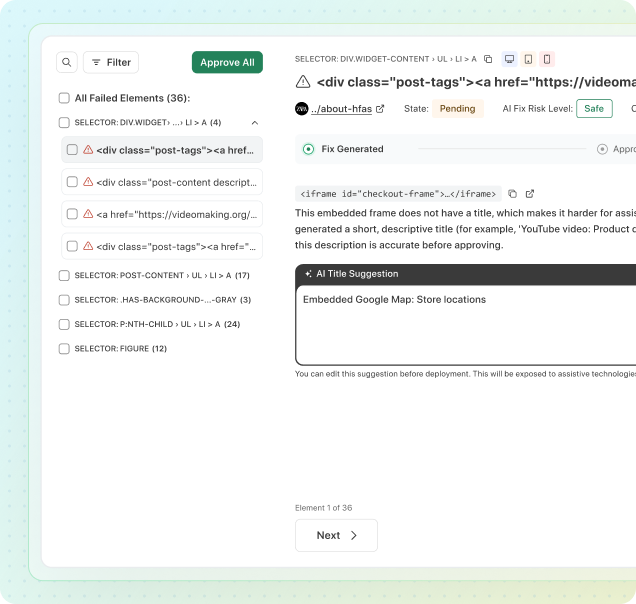
SmartFix™ is an AI-powered accessibility remediation tool developed by AccessibilityChecker.org. It uses issues identified by ACE Scanner or the ACE Extension to generate code-level fix suggestions powered by machine learning.
These are not generic, widget-driven front-end changes. They are precise fixes generated for each specific element and use case. SmartFix focuses on non-visual issues such as missing alt text, ARIA labels, form labels, etc, where fixes are repetitive and time-consuming at scale. It does not address visual or design-related issues like color contrast, which should be resolved directly in your source code.
The key difference with SmartFix is user control. The AI generates a suggestion, you review the code, edit or approve it, and then apply the fix via a lightweight JS script or export it for your development team. You remain in full control at every step. No fixes are applied automatically, and nothing changes without your explicit approval.
How SmartFix Works
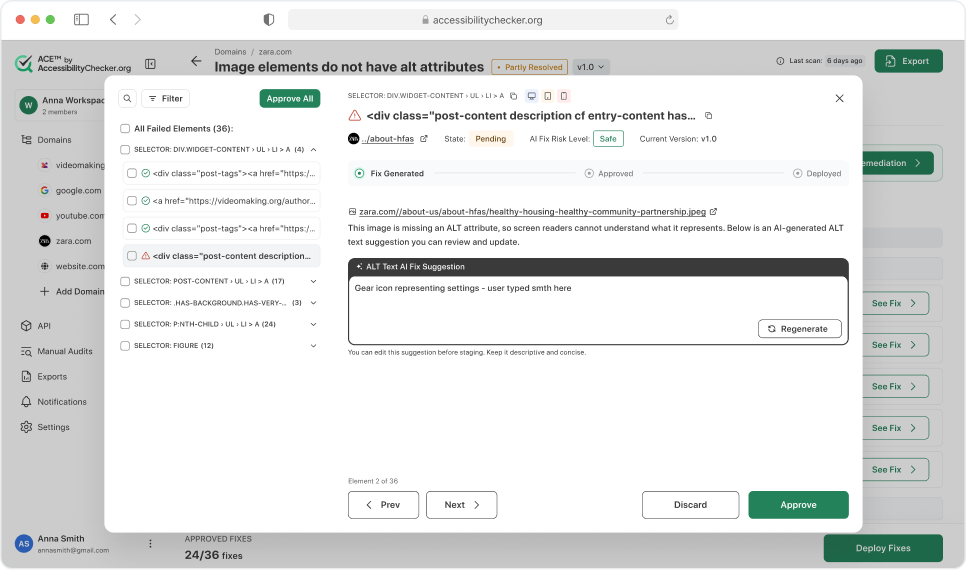
SmartFix by AccessibilityChecker.org uses a simple three-step process to transform accessibility issues into fixed code. Every step includes human review and approval, ensuring that AI suggestions never become automated changes you didn't authorize.
What SmartFix Can Fix
SmartFix by AccessibilityChecker.org addresses 31 common accessibility issues across websites. These are divided into two categories:
SmartFix maps each issue type to real-world accessibility problems observed across millions of websites, helping organizations prioritize fixes efficiently.
SmartFix can automatically correct common accessibility problems including:
- Missing link, button, and form labels
- Images without descriptive alt text
- Incorrect or missing ARIA attributes
- Table captions and proper header scopes
- Heading structure and hierarchy
- Color contrast issues
- Skip navigation links and live region notifications
- Language consistency and landmark roles
These 23 Safe Fixes can be applied automatically with minimal risk, reducing manual effort and accelerating remediation.
Some accessibility issues are context-sensitive and require developer review before applying changes. SmartFix can suggest solutions, but developers must confirm them to ensure correct behavior. Examples include:
- Missing or complex landmark regions
- Links that need distinguishing beyond color
- Custom interactive controls
- Animations, modals, and focus management
- Complex focus order issues
There are 8 such issues that need consideration, but SmartFix provides actionable guidance to streamline the process.
| ACE Rule ID | Title | Risk Level |
|---|---|---|
ace-nav-link-name |
Confirm that all hyperlink elements have meaningful, discernible text content. | Safe |
ace-img-alt-text |
Verify images have alternative text or are explicitly marked as decorative. | Safe |
ace-form-button-name |
Verify all button elements have accessible text content for assistive technologies. | Safe |
ace-struct-frame-title |
Verify that iframe and frame elements have an accessible name via the title attribute. | Safe |
ace-form-label |
Verify that every form control has an associated visible label that is programmatically linked. | Safe |
ace-form-select-name |
Verify that select dropdown elements have an accessible name through labels or ARIA attributes. | Safe |
ace-aria-valid-value |
Confirm all ARIA attribute values conform to the allowed value types defined in the specification. | Safe |
ace-meta-lang-present |
Confirm the HTML element includes a lang attribute for assistive technology support. | Safe |
ace-form-label-visible |
Flag form controls relying solely on title or aria-describedby instead of visible labels. | Safe |
ace-aria-valid-attr |
Confirm attributes prefixed with aria- are recognized and are valid according to the WAI-ARIA specification. | Safe |
ace-meta-lang-valid |
Validate the lang attribute on the HTML element is a recognized BCP 47 tag. | Safe |
ace-aria-input-name |
Confirm ARIA-based input fields like textbox and combobox have accessible names. | Safe |
ace-aria-toggle-name |
Check that ARIA toggle controls like checkbox and switch have accessible names. | Safe |
ace-aria-command-name |
Validate that interactive ARIA elements like buttons and links have accessible names. | Safe |
ace-aria-tooltip-name |
Verify that the tooltip elements implemented with ARIA have descriptive accessible names. | Safe |
ace-aria-dialog-name |
Confirm that dialog and alertdialog elements have descriptive accessible names. | Safe |
ace-form-input-image-alt |
Check that image-type input elements include descriptive alternative text. | Safe |
ace-img-svg-alt |
Check that SVG elements used as images have appropriate accessible text through title or aria-label. | Safe |
ace-img-role-alt |
Check that elements assigned role="img" have appropriate alternative text. | Safe |
ace-img-area-alt |
Confirm clickable regions in image maps include descriptive alternative text for screen readers. | Safe |
ace-form-input-button-name |
Confirm that submit, reset, and button-type input elements have discernible text labels. | Safe |
ace-struct-frame-unique-title |
Check that each iframe and frame element has a unique descriptive title. | Safe |
ace-img-no-redundant-alt |
Identify images whose alternative text duplicates adjacent visible text content. | Safe |
ace-landmark-all-content |
Check all visible page content is within defined landmark regions for navigation. | Requires dev attention |
ace-text-link-distinguish |
Check that hyperlinks within text blocks are visually distinguishable by more than just color. | Requires dev attention |
ace-aria-allowed-role |
Validate that assigned ARIA roles are appropriate and permitted for the given HTML element type. | Requires dev attention |
ace-meta-viewport-scale |
Check the viewport meta tag does not disable user scaling or limit zoom. | Requires dev attention |
ace-aria-treeitem-name |
Check that tree view item elements have descriptive accessible names. | Requires dev attention |
ace-aria-meter-name |
Check that the meter elements using ARIA roles have a descriptive accessible name. | Requires dev attention |
ace-media-object-alt |
Verify that embedded object elements include descriptive alternative text. | Requires dev attention |
ace-aria-deprecated-role |
Flag elements using ARIA roles that have been deprecated in the current specification. | Requires dev attention |
Organizations using AccessibilityChecker.org’s SmartFix typically find that using all 31 Fixes resolves 60–70% of their accessibility issues entirely. The 8 Requires Developer Attention issues often need just a brief developer review. This means SmartFix can dramatically accelerate your remediation timeline while keeping humans in control of the process.
SmartFix vs. Accessibility Overlays
Many products on the market are marketed as “accessibility widget overlays.” They promise that a single JavaScript file can instantly fix all accessibility issues on a website, giving users tools like font resizing, contrast adjustments, and keyboard navigation. In reality, these widgets rarely address the underlying code issues that affect assistive technologies and often introduce new problems.
SmartFix by AccessibilityChecker.org takes a different approach. It does not use a visual widget or attempt to patch accessibility at runtime. Instead, it identifies specific issues using the ACE Scanner or ACE Extension, generates AI-powered code-level fix suggestions, and presents them to you for review. You retain full control: review each suggested fix, edit if needed, and then apply it directly to the site or implement it in your source code.
| Dimension | Accessibility Widget Overlays | SmartFix by AccessibilityChecker.org |
|---|---|---|
| How It Works | Injects one JavaScript file to try to fix all accessibility issues at runtime | Uses AI to generate targeted suggestions for specific accessibility issues like missing alt text or form labels |
| Affects Source Code | No, changes are applied at runtime only | Optional; you can apply fixes directly or implement them in your source code |
| Fix Scope | Attempts to “fix” everything, often masking problems rather than solving them | Focused on high-confidence issues; does not try to fix visual problems like contrast |
| User Control | No, changes happen automatically without review | Full control: review, edit, approve, and then apply fixes |
| Screen Reader Experience | Often creates new issues and can make accessibility worse | Improves accessibility for screen reader users and other assistive technology |
Accessibility widget overlays promise a quick fix but mostly mask problems and fail real users. SmartFix does not pretend to fix everything with one click. Instead, it provides targeted, high-confidence AI suggestions that you can review, edit, and apply.
User-Controlled Approval Process
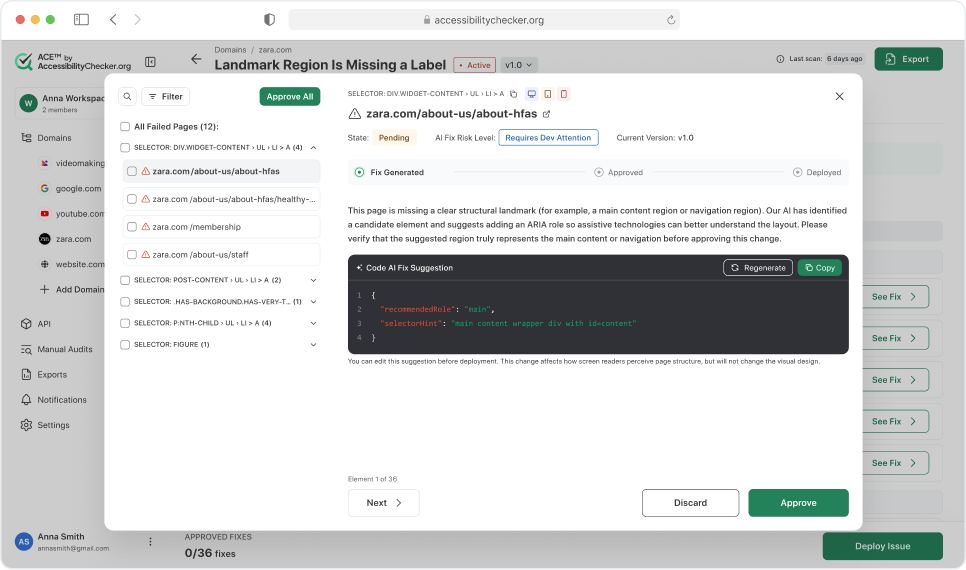
When you open an issue to review AI-generated suggestions, you see three things: the element affected, the suggested code fix, and the reasoning behind it. The interface walks you through fixes one at a time, showing exactly what the AI recommends and why, so you can make an informed decision before anything changes on your site.
When you open an issue to review AI-generated suggestions, you see three things: the element affected, the suggested code fix, and the reasoning behind it. The interface walks you through fixes one at a time, showing exactly what the AI recommends and why, so you can make an informed decision before anything changes on your site.
For each suggestion you have three options: Approve (apply the fix), Discard (skip it), or Regenerate (ask the AI for an alternative suggestion). You can also copy the code and apply it manually if you prefer to work through your own deployment process. For certain issue types, you can also edit the suggested fix directly before approving it, allowing you to fine-tune the output to match your site's specific implementation.
For Safe fixes, such as missing alt text, form labels, button names, and ARIA attribute values, approval is often straightforward. The AI has high confidence in these suggestions and they typically require no visual changes to your site. For Requires Dev Attention issues, such as landmark regions, ARIA roles, or viewport scaling, the AI provides context and reasoning but the decision stays with you. These fixes may affect page structure or behaviour in ways worth reviewing carefully with your team.
Once you've reviewed all suggestions for an issue, approved fixes move from Fix Generated to Approved, and are only Deployed when you explicitly trigger deployment. Nothing goes live without a deliberate action on your part.
SmartFix keeps a complete version history of every deployed fix. If a change needs to be revisited, you can deploy a new version or roll back to a previous one at any time, giving you full control over what runs on your site.
Who Uses SmartFix?
SmartFix is built for organizations that want to move faster on accessibility without creating more work for developers. Whether you're a solo consultant or an enterprise team managing hundreds of pages, it removes the friction between identifying issues and actually fixing them.
SmartFix in the Broader ACE Platform
SmartFix is the remediation layer of the ACE Platform by AccessibilityChecker.org. You identify issues with ACE Scanner or ACE Extension, SmartFix helps you fix them, and Compliance Vault stores the evidence. All three tools share the same ACE Engine, the same issue classifications, and the same dashboard for tracking progress.
Frequently Asked Questions
SmartFix: AI-powered code generation, human-controlled approval.