Home / Platform / ACE Scanner

Automated Accessibility Testing — ACE™ Scanner

Scan any website for WCAG 2.2, ADA, Section 508, and EAA compliance issues. Get detailed results with ACE Impact Classification with step by step instructions and AI-assisted fixes.
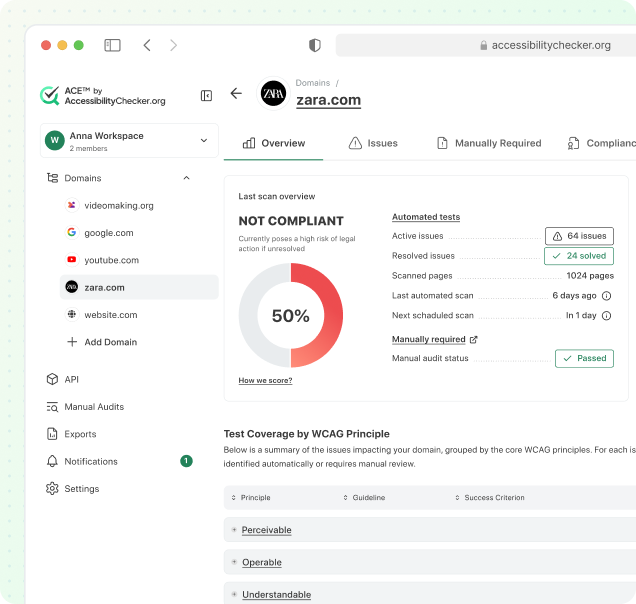

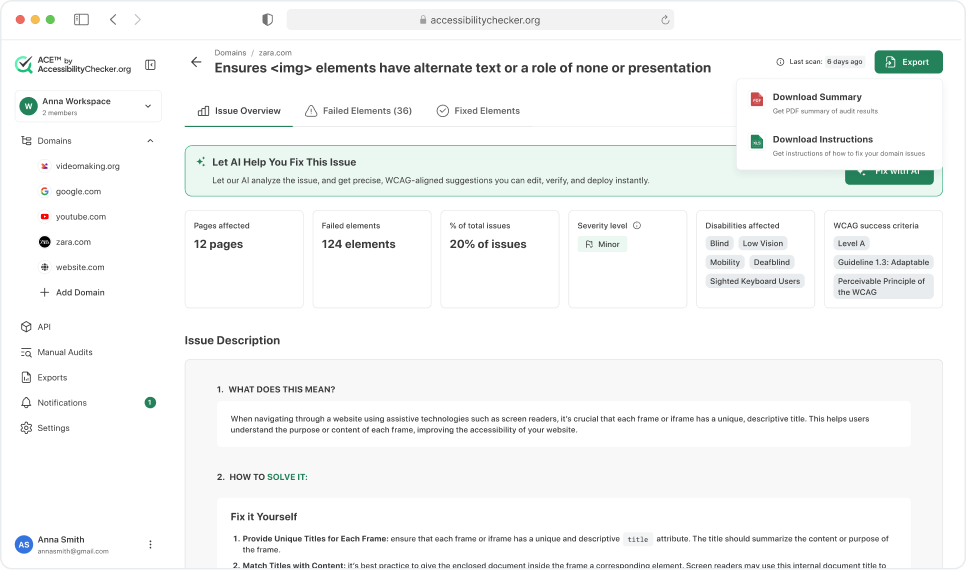
ACE Scanner Preview
Trusted by businesses, agencies, and the public sector to deliver better digital accessibility worldwide. Join them today!
Trusted by brand logo

What Is ACE Scanner?

ACE Scanner is an automated accessibility testing tool developed by AccessibilityChecker.org. It tests websites against WCAG 2.2, ADA, Section 508, the European Accessibility Act (EAA), and EN 301 549. Unlike basic testing tools that surface raw technical violations, ACE Scanner is powered by the proprietary ACE™ Engine, which assigns each issue a unique ACE Rule ID and classifies it using the ACE™ Impact Classification system: Legal Risk, User Impact, or Best Practice.

ACE Scanner is designed for teams that need more than a pass/fail report. It provides actionable remediation guidance for every issue, tracks compliance over time, detects recurring patterns across hundreds of pages, and integrates with your existing development workflow through API access.. Whether you're a solo developer checking a single page or an enterprise team managing dozens of domains, ACE Scanner scales to fit your accessibility testing needs.
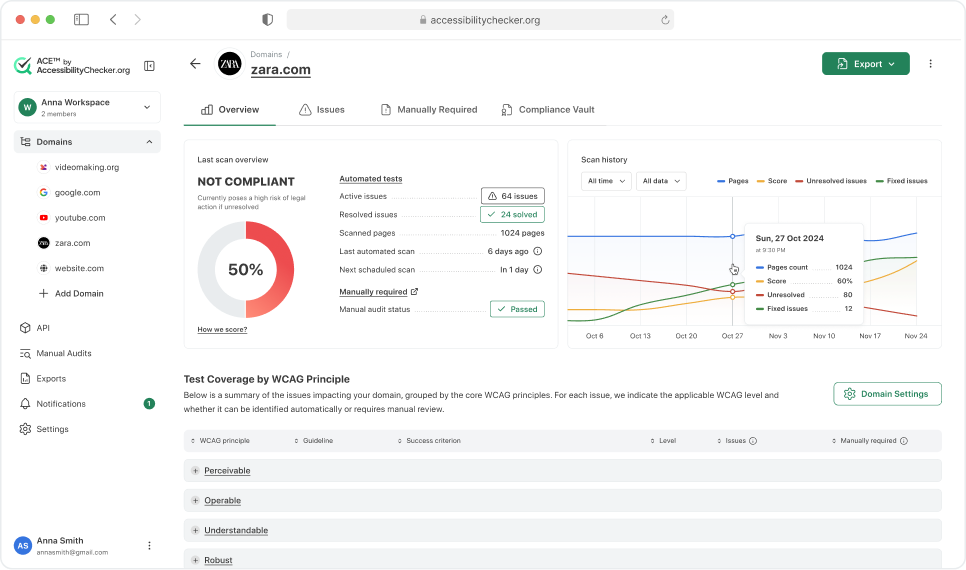
ACE Scanner is part of the broader ACE Platform by AccessibilityChecker.org, which also includes the ACE Extension for browser-based interactive testing, SmartFix™ for AI-powered remediation, Compliance Vault™ for evidence management, LiveStatement™ for auto-updating accessibility statements, and a full REST API for CI/CD integration.
What Is ACE Scanner

How ACE Scanner Works

Running an accessibility scan with ACE Scanner takes less than a minute. Enter any URL, and ACE Engine automatically crawls the page, evaluates it against 100+ accessibility rules, and produces a detailed report with your ACE Score, categorized issues, and step-by-step fix instructions.

1
Enter URL
Paste any URL. ACE Scanner crawls the page and tests against 100+ accessibility rules covering WCAG 2.2, ADA, Section 508, and EAA.
2
ACE™ Engine Analysis
The proprietary ACE Engine runs automated checks, assigns ACE Rule IDs, and applies ACE Impact Classification: Legal Risk, User Impact, or Best Practice.
3
Results & Guidance
View your ACE Score, browse categorized issues, and follow actionable remediation steps for each finding. Export to PDF or Excel.

Cross-Page Pattern Detection

Most accessibility issues aren't unique. They repeat across pages because they originate from shared components: a navigation bar, a button template, a form layout. ACE Scanner by AccessibilityChecker.org uses component grouping to detect these cross-page patterns automatically. Instead of showing you 200 separate "button missing ARIA label" issues, it groups them into a single pattern and tells you exactly which component to fix. This turns what looks like an overwhelming remediation backlog into a manageable list of targeted fixes.
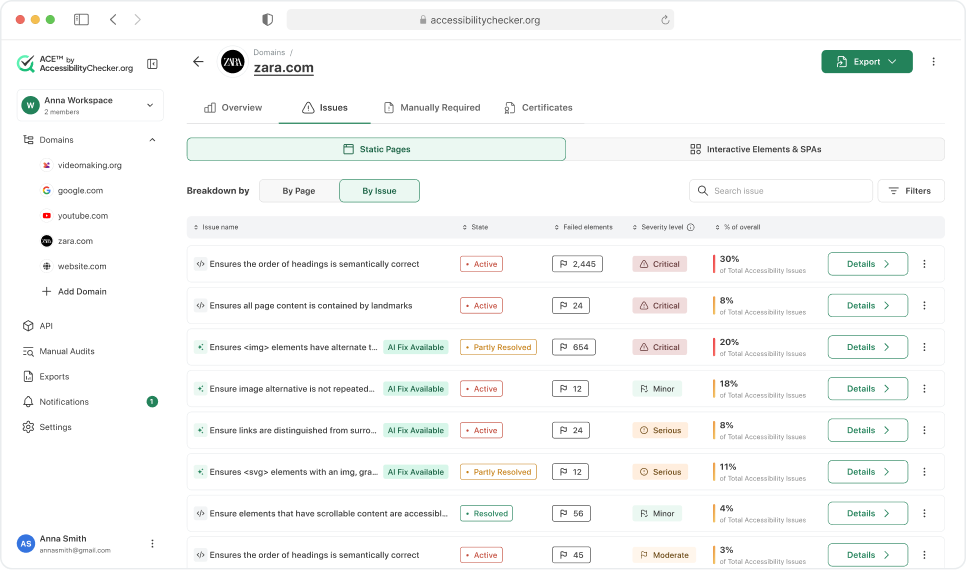
ACE Scanner identifies recurring issues across your entire site using component grouping. When one fix resolves the same issue on 50 pages, Scanner shows it as a single pattern. This means 50–70% of accessibility gaps can typically be resolved by fixing just a handful of common patterns.
Example
If your site has 200 button elements missing ARIA labels, ACE shows this as one pattern affecting 200 components across 47 pages. Fix it once in your button component, and the pattern is resolved site-wide.
Cross-Page Pattern Detection

Scanning Capabilities

ACE Scanner supports multiple scanning modes designed for real-world website architectures. Crawl an entire domain or sitemap.xml automatically, or upload a list of specific URLs for targeted analysis. For teams working with staging environments, single-page applications, or sites behind authentication (e.g., Cloudflare, WAF, or basic auth), ACE Scanner offers flexible configuration to ensure all relevant pages are accessible and testable.

Scan results include your ACE Score, a breakdown of issues by ACE Impact Classification, and detailed remediation guidance with code-level recommendations for each finding.

Automatic Domain Crawl
Crawl unlimited pages in a single scan session.
Subdomain Coverage
Include multiple subdomains (api.example.com, docs.example.com, etc.).
Sitemap Scanning
Submit a sitemap.xml and ACE™ crawls it automatically.
Staging Environment Testing
Scan pre-production sites before going live.
Password-Protected Pages
Scan restricted content using form-based login and HTTP authentication (basic, bearer tokens, or custom headers).
Multi-Device & Delayed Content Scanning
Scans across desktop, tablet, and mobile viewports. Configurable page load delays to catch issues on JavaScript-rendered and single-page applications.
SPA & Interactive Testing
Test single-page applications and interactive user flows using the ACE Chrome Extension, enabling scans of dynamic content, user-triggered states, and complex UI interactions.
Custom HTTP headers
Support for Cloudflare, WAF, and firewall authentication.

ACE Impact Classification

Every issue detected by ACE Scanner includes the standard WCAG conformance level (A, AA, or AAA) so you always know which success criterion is affected. But conformance levels alone don't tell you what to fix first. A Level A violation could be a keyboard trap that blocks all access, or it could be a minor markup issue. ACE Impact Classification, developed by AccessibilityChecker.org, adds a second layer that tells you the real-world consequence of each issue.

Legal Risk
Issues that create direct legal and compliance exposure: keyboard traps, missing form labels, images without alt text. Fix these first.
User Impact
Issues that significantly impair usability: poor color contrast, unclear link text, missing skip links. Important for real users, even if not an immediate legal trigger.
Best Practice
Enhancements beyond strict compliance: ARIA optimizations, improved semantic markup, redundant label cleanup. Recommended, not required.

Together, WCAG level and ACE Impact Classification give you both the technical standard and the practical priority. ACE Impact Classification is proprietary to AccessibilityChecker.org.


Accessibility Standards Covered

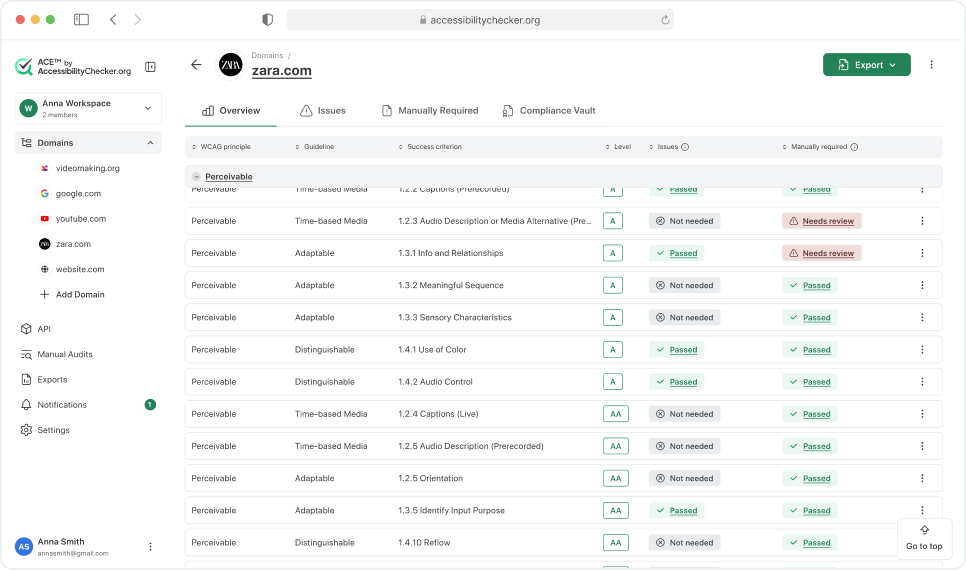
ACE Scanner by AccessibilityChecker.org tests against all major accessibility standards and legal frameworks. This includes WCAG 2.2 at all three conformance levels (A, AA, and AAA), the Americans with Disabilities Act (ADA) which references WCAG as the technical standard for web accessibility, Section 508 of the Rehabilitation Act which governs federal websites and contractors, the European Accessibility Act (EAA) which takes effect for private-sector organizations in the EU, and EN 301 549, the European standard for ICT accessibility. Each issue detected by ACE Scanner is mapped to the specific WCAG success criterion it violates, so you always know exactly which requirement is affected and what the expected behavior should be.
Accessibility Standards Covered

Monitoring & Compliance

Accessibility is not a one-time fix. Websites change constantly: new pages are published, content is updated, features are deployed. ACE Scanner provides continuous monitoring so you can catch regressions as they happen, not months later during an audit. Scheduled rescans run automatically, and alerts notify your team the moment your ACE Score drops or new Legal Risk issues are introduced.

Automated Scheduled Rescans
Daily, weekly, or monthly. Stay on top of compliance without manual work.
Continuous Monitoring with Alerts
Get notified when new issues arise or your score drops.
Automated Evidence Collection
Every scan result is timestamped and archived for audits.
Accessibility Certificates
Scannable certificates proving compliance at specific dates.

Reporting

ACE Scanner generates detailed accessibility reports that are designed for different audiences. PDF reports are formatted for stakeholders, legal teams, and auditors who need a clear summary of compliance status. Excel exports give development teams raw data they can filter, sort, and integrate into project tracking tools. For agencies managing client accessibility, white-labeled PDF reports carry your branding instead of ours. Every report includes the ACE Score, a breakdown by ACE Impact Classification, and individual issue details with ACE Rule IDs and remediation guidance.
Accessibility Standards Covered
PDF Exports
Share reports with stakeholders and legal teams.
Excel Exports
Integrate results into your tracking systems.
White-Labeled Reports
Agencies can brand reports with their own logo.
WCAG Principle Breakdown
Issues categorized by Perceivable, Operable, Understandable, Robust.

Team & Workflow

Accessibility compliance is a team effort. ACE Scanner supports multi-user collaboration with role-based permissions, so you can give developers full access to technical details while stakeholders see high-level compliance dashboards. Manage multiple domains and subdomains from a single ACE Dashboard.

Role-Based Permissions
Admin, Editor, Viewer roles with customizable access.
Workspaces
Organize projects and access multiple workspaces from one account.
Multi-Domain Management
Manage dozens of properties from a single dashboard.
Notification Preferences
Customize who gets alerted for which severity levels.

Who Uses ACE Scanner?

ACE Scanner by AccessibilityChecker.org is used by development teams, QA engineers, compliance officers, digital agencies, and accessibility consultants. Small businesses use it to run quick scans on their websites and fix the most impactful issues. Enterprise teams use it to monitor hundreds of pages across multiple domains, with scheduled rescans built into their development workflow. Agencies use white-labeled reports to deliver accessibility audits to their clients under their own brand. Government contractors use it to verify Section 508 compliance before procurement reviews.

ACE Scanner works with any website technology: static HTML, WordPress, Shopify, React, Angular, Vue, Next.js, and any other framework that renders in a browser. There is nothing to install on your server. You enter a URL, and ACE does the rest.


Frequently Asked Questions

ACE Scanner is an automated web accessibility testing tool by AccessibilityChecker.org. It works by crawling your website and testing every page against 100+ accessibility rules derived from WCAG 2.2, ADA, Section 508, and EAA standards. The proprietary ACE Engine assigns each issue a unique ACE Rule ID, classifies it using ACE Impact Classification (Legal Risk, User Impact, or Best Practice), and calculates an overall ACE Score for your site. You receive a detailed report with step-by-step remediation instructions for every issue found.
ACE Scanner runs automated scans on a weekly schedule, with email notifications when scans complete or your ACE Score changes. You can also trigger unlimited on-demand rescans at any time. Continuous monitoring ensures regressions are caught early — not just during periodic audits.
ACE Scanner tests against WCAG 2.2 at all three conformance levels (A, AA, and AAA), the Americans with Disabilities Act (ADA), Section 508 of the Rehabilitation Act, the European Accessibility Act (EAA), and EN 301 549. Every issue is mapped to the specific WCAG success criterion it violates, so you always know exactly which requirement is affected and how to fix it.
ACE Impact Classification is a proprietary issue categorization system developed by AccessibilityChecker.org. Instead of using generic severity labels, it classifies every issue into three tiers: Legal Risk (issues that create direct compliance exposure, like missing form labels or keyboard traps), User Impact (issues that significantly impair user experience, like poor color contrast or unclear link text), and Best Practice (improvements that enhance accessibility quality beyond strict compliance). This helps teams prioritize what to fix first based on real-world consequences.
Yes. ACE Scanner supports scanning pages behind authentication. You can provide custom HTTP headers for Cloudflare or WAF-protected sites, or supply login credentials so the scanner can access authenticated content. This is essential for testing internal dashboards, admin panels, and member-only areas that are often overlooked in accessibility audits.

Automated testing with ACE Scanner catches approximately 70–80% of accessibility issues quickly and at scale. It excels at detecting missing alt text, invalid or broken ARIA attributes, color contrast violations, missing form labels, and structural issues.

Manual testing addresses what automation cannot — such as logical focus order, screen reader usability of custom components, and whether content is clear and understandable in context. AccessibilityChecker.org supports manual testing in two ways: teams can follow guided procedures to perform the checks themselves, or they can rely on our Managed Accessibility service, where experts conduct the evaluation for them.For comprehensive accessibility coverage, most organizations use a combination of both automated and manual testing.

ACE Scanner uses component grouping to identify identical issues that repeat across multiple pages. For example, if your site's navigation bar is missing ARIA labels on 150 pages, ACE shows this as a single pattern rather than 150 separate issues. Fixing the navigation component once resolves the pattern across every page. This approach typically reduces the total remediation workload by 50–70%, because most accessibility issues originate from a small number of shared components.
ACE Scanner exports reports in PDF (for stakeholders, auditors, and legal teams), Excel (for development teams and project tracking), and white-labeled PDF (for agencies serving clients). All reports include the ACE Score, issue breakdown by ACE Impact Classification, individual issue details with ACE Rule IDs, and specific remediation steps. Reports can also break down issues by WCAG principle (Perceivable, Operable, Understandable, Robust).
Yes. You can manage unlimited domains and subdomains from a single ACE Dashboard. Each domain gets its own ACE Score, scan history, and compliance tracking. This is designed for agencies, enterprises, and organizations managing multiple web properties that all need to meet accessibility standards.
ACE Scanner is powered by the proprietary ACE Engine developed by AccessibilityChecker.org. It provides features that go beyond basic automated scanning: cross-page pattern detection that groups recurring issues by component, (ACE Impact Classification system (Legal Risk / User Impact / Best Practice) for real-world prioritization, unique ACE Rule IDs for consistent issue tracking, and tight integration with the rest of the ACE Platform including SmartFix for AI-powered remediation and Compliance Vault for evidence management. It's designed as a complete accessibility compliance platform, not just a scanner.
Yes. ACE Engine scans across desktop, tablet, and mobile viewports. Many accessibility issues only appear at certain screen sizes, such as hidden navigation menus, touch target sizing, content reflow problems, or elements that become inaccessible when the layout changes. ACE Engine tests all three viewports to ensure issues are caught regardless of how users access your site.
Start Your 7-Day Free Trial

Run your first accessibility scan in under a minute.