- Categories (3)
- Guides - Platform
- Guides - Reviews
- Legislations
What Is WebMCP? A Plain-English Guide to the New Agent Standard on the Web


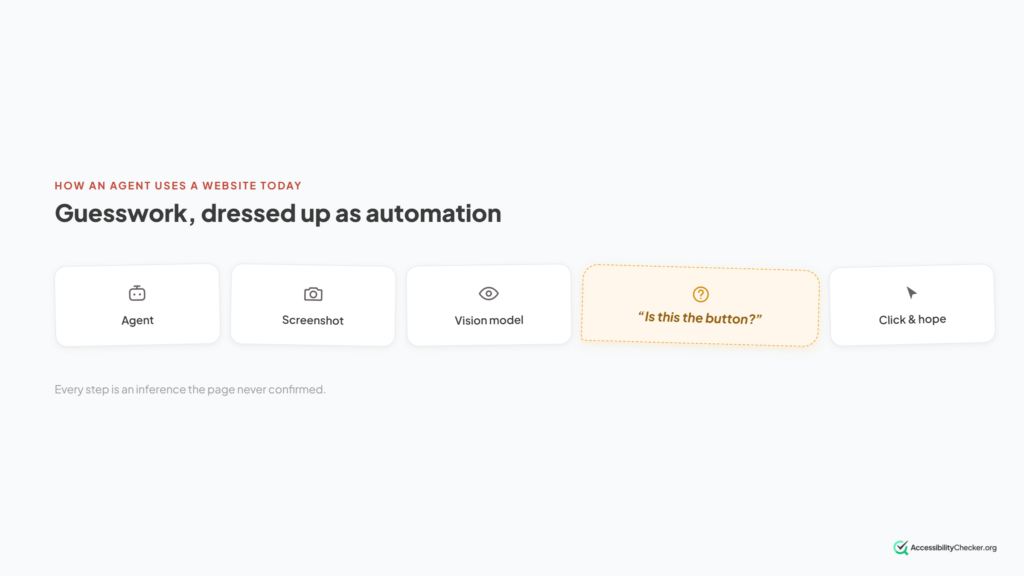
Right now, an AI agent trying to use your website does something impressive.
And slightly ridiculous.
It looks at your website. It tries to work out which rectangle is the “Add to cart” button. It moves a virtual mouse over that rectangle. Then it clicks and hopes for the best.
It works.
Sort of.
Until you rename a label. Or a menu opens differently. Or an element loads half a second late. Or a cookie banner appears over the thing the agent was trying to click.
Then it breaks.
WebMCP is an attempt to give AI agents a better way to use the web.
TL;DR: In plain English, WebMCP lets your website tell an AI agent what it can do instead of making the agent figure it out from the interface.
- What Is WebMCP?
- Why Is Everyone Talking About WebMCP?
- How Does WebMCP Actually Work?
- There Are Two Ways to Add WebMCP
- Who Actually Calls a WebMCP Tool?
- WebMCP vs MCP: What's the Difference?
- Is WebMCP Secure?
- Can You Actually Use WebMCP Today?
- Be Careful With Older WebMCP Tutorials
- What Happened When People Actually Shipped WebMCP?
- WebMCP and Accessibility Have an Interesting Overlap
- Does WebMCP Help SEO?
- Should You Implement WebMCP Now?
- Can Website Scanners Actually Detect WebMCP?
- The Bottom Line on WebMCP
What Is WebMCP?
WebMCP is a proposed browser API that allows websites to expose their functionality to AI agents as structured tools.
Imagine you run an ecommerce website.
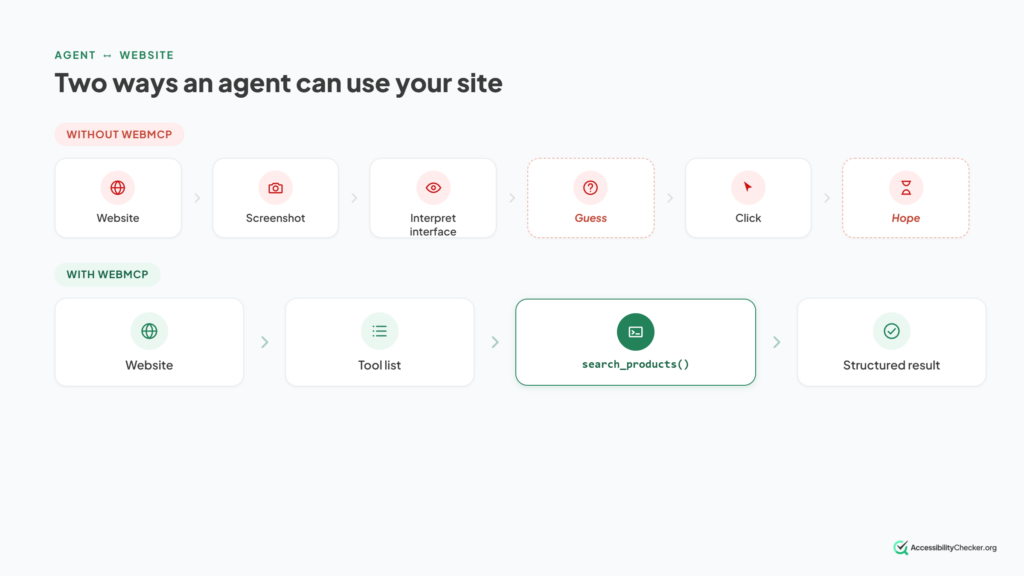
Today, an AI agent looking for a blue shirt might have to:
- Find the search box.
- Click it.
- Type “blue shirt”.
- Find the search button.
- Click that.
- Wait for the results.
- Find the category filter.
- Work out how that filter operates.
- Select the right option.
With WebMCP, the website could expose something like:
The agent sees that search_products exists, understands what information it needs and calls it directly.
The website returns the result.
Done.
No hunting for the search box. No virtual mouse. No guessing which button does what.
That’s the basic idea.
But there’s a lot more going on underneath it.
Why Is Everyone Talking About WebMCP?
WebMCP matters because browser-based AI agents are becoming more capable, while the websites they’re trying to use were never designed for them.
Websites are primarily built for humans.
A human understands that a shopping-cart icon opens their basket. They know a magnifying glass probably means search. They can usually work out that clicking a date opens a calendar.
AI agents have to infer those things.
WebMCP changes the relationship.
Instead of saying:
“Here’s my interface. Work it out.”
the website can effectively say:
“Here are the actions I support. Here’s what each one does. Here’s the information you need to give me.”
And this isn’t simply a third-party tool someone has decided to call a web standard.
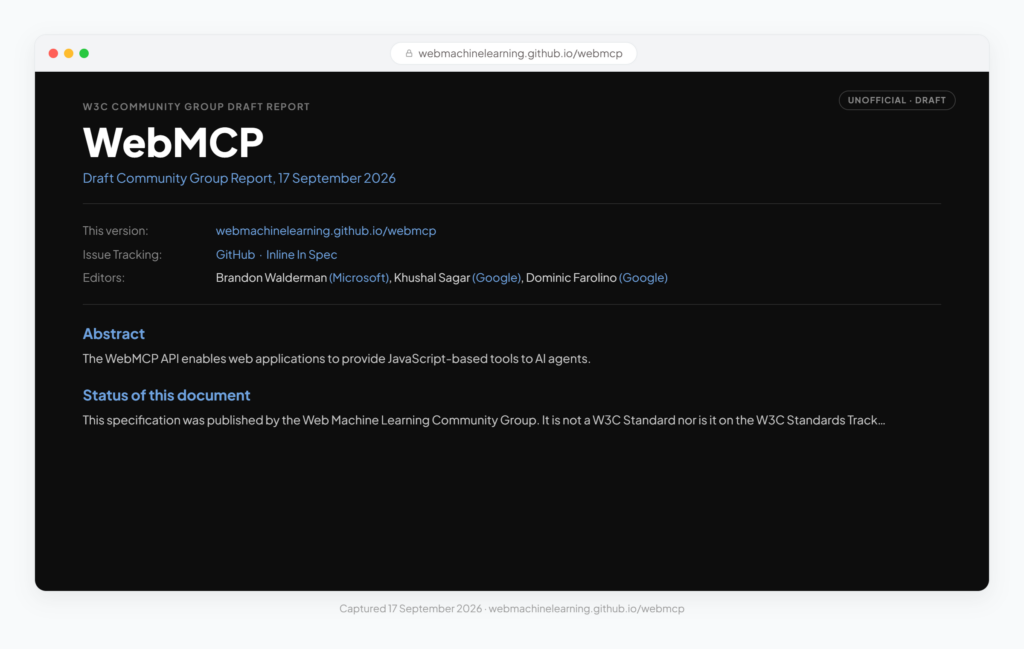
WebMCP is being developed through the W3C’s Web Machine Learning Community Group, with involvement from engineers at Google and Microsoft.
The project also didn’t begin as one neat proposal.
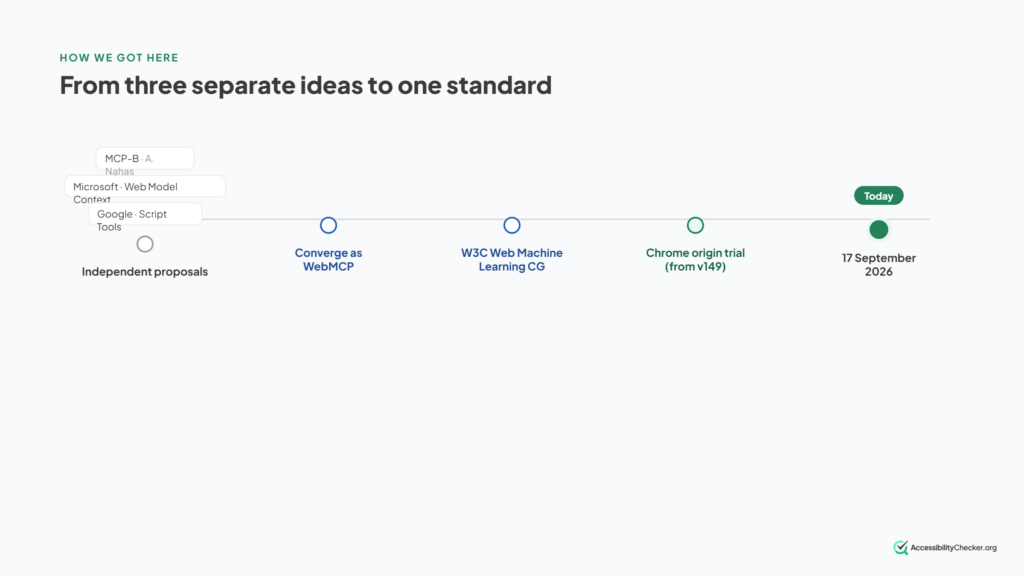
Several similar ideas emerged independently, including Microsoft’s Web Model Context proposal, Google’s Script Tools work and MCP-B, a browser implementation created by Alex Nahas.
Those ideas eventually converged around WebMCP.
That combination of browser-vendor involvement and a live Chrome experiment is why WebMCP is worth paying attention to.
But there’s an important qualification.
WebMCP isn’t a finished web standard.
It’s still experimental.
We’ll come back to exactly how experimental later.
How Does WebMCP Actually Work?
Let’s look at a simplified example.
A website could register a product-search tool like this:
await document.modelContext.registerTool({
  name: "search_products",
  description: "Search the product catalog by keyword and category.",
  inputSchema: {
    type: "object",
    properties: {
      query: {
        type: "string",
        description: "Search keywords"
      },
      category: {
        type: "string",
        description: "Optional category filter"
      }
    },
    required: ["query"]
  },
  execute: async ({ query, category }) => {
    return await searchCatalog(query, category);
  }
});
Copy
If JavaScript isn’t your thing, don’t worry about the code.
Four parts matter.
- name tells the agent what the tool is called.
- description explains what the tool does.
- inputSchema tells the agent what information the tool accepts.
- execute contains the functionality that actually runs.
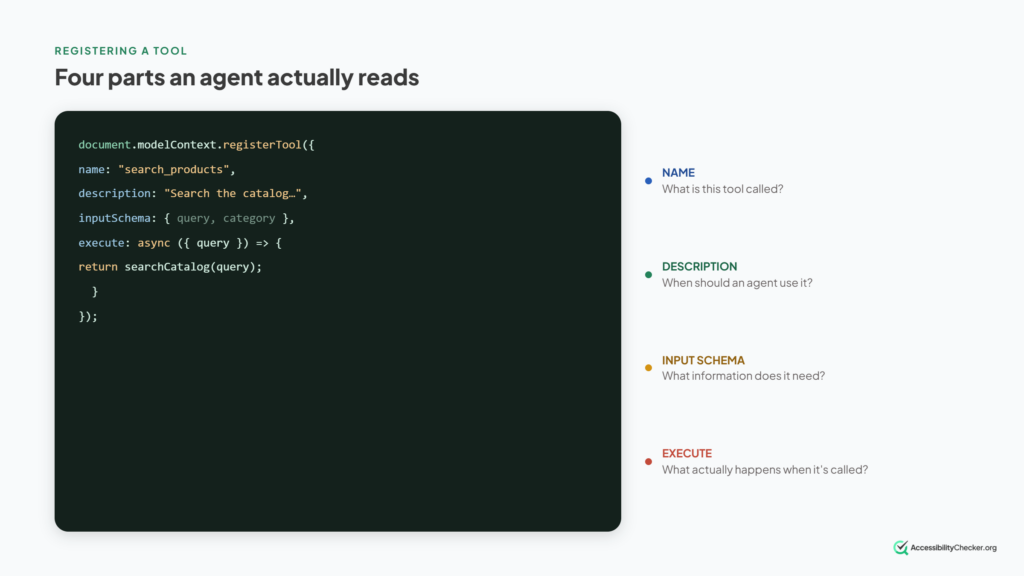
The description is particularly important.
It’s not simply documentation for a developer.
An AI agent reads it.
That’s how the agent can decide whether a particular tool is relevant to what the user wants.
And the tool runs in the page the user already has open.
That means it can work with the website’s existing frontend functionality and the user’s existing session rather than requiring the agent to operate a completely separate API.
That’s one of the things that makes WebMCP interesting.
There Are Two Ways to Add WebMCP
WebMCP isn’t limited to JavaScript functions.
The current approach includes two ways for a website to expose tools.
1. The Imperative API
This is the JavaScript approach we just looked at.
A developer explicitly registers a tool using:
This makes sense for dynamic functionality such as:
- searching a product catalogue;
- applying filters;
- updating application state;
- checking availability;
- or performing actions already handled by the site’s frontend code.
The developer controls what the tool is called, what it accepts and what happens when it runs.
2. The Declarative API
This one is arguably more interesting for ordinary websites.
Instead of creating a JavaScript tool from scratch, WebMCP can use an existing HTML form.
Imagine you already have this:
<form
  toolname="search_products"
  tooldescription="Search the product catalog by keyword">

  <input name="query" type="text" required>

  <select name="category">
    <option>Shirts</option>
    <option>Shoes</option>
  </select>

  <button type="submit">Search</button>
</form>
Copy
A human still sees a normal search form.
But an agent gets a structured tool it can understand.
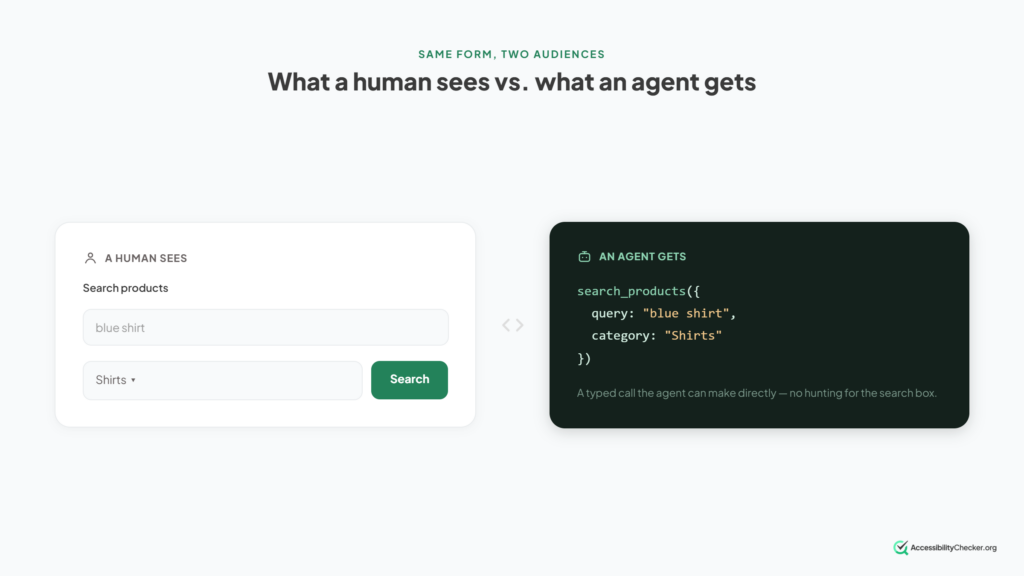
That’s potentially significant.
It means websites don’t necessarily need to create an entirely separate “AI version” of every interaction.
Well-structured existing HTML can do some of the work.
There’s a catch, though.
The declarative side of WebMCP is still evolving, and parts of it remain less settled than the basic idea suggests.
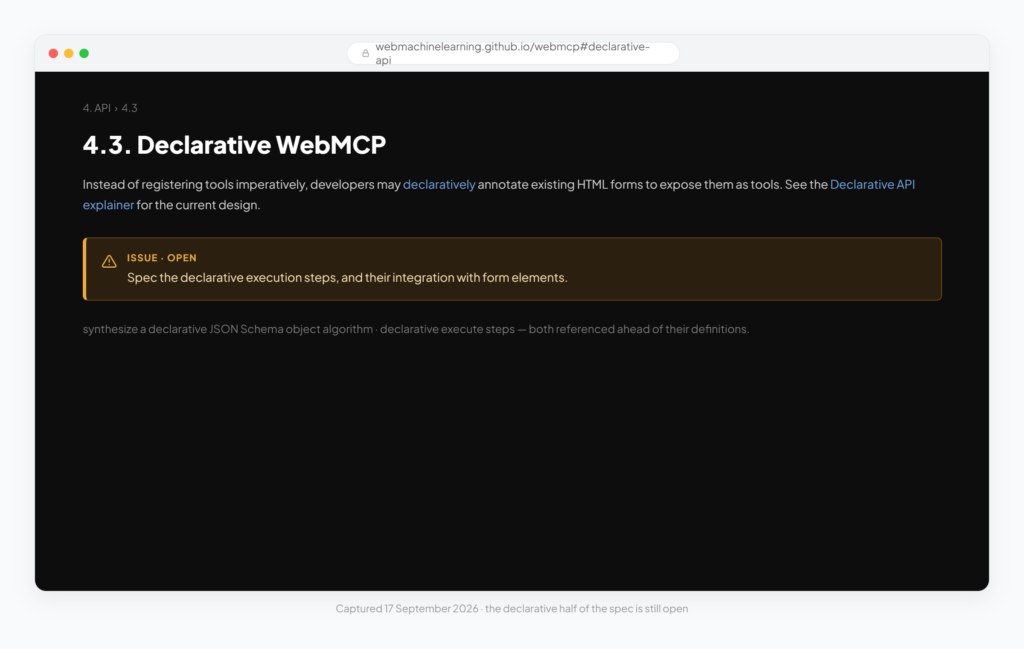
So it’s worth separating the direction of travel from the finished mechanics.
The direction is clear.
The mechanics are still being worked out.
Who Actually Calls a WebMCP Tool?
You’ve registered a tool.
So what’s sitting on the other end?
Broadly, there are two possibilities.
An in-page agent can run within the page or an iframe and discover tools exposed by the website.
A browser agent can receive information about the tools the current page makes available and decide whether one is useful for the user’s request.
Which agents actually do this today is a moving target. The project’s own implementation-status file is the place to check, and it changes more often than the specification does.
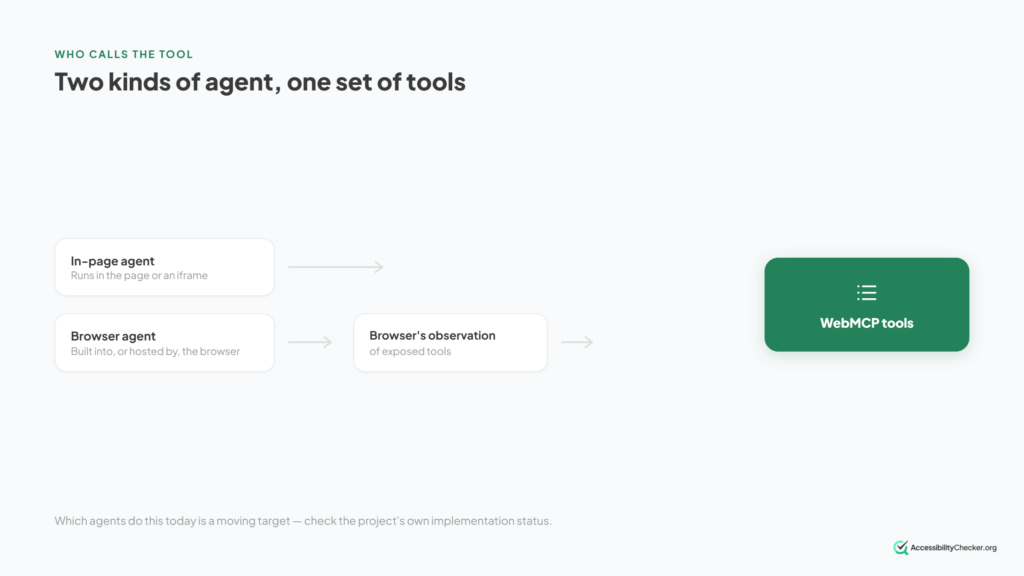
There’s also an important detail hidden by the name “WebMCP”.
WebMCP does not mean that every browser has to expose those tools using the Model Context Protocol itself.
The browser could potentially translate the tools into whatever function-calling system its agent uses.
So the “MCP” in WebMCP is slightly misleading if you interpret it as:
“This is just an MCP server inside a website.”
It isn’t.
Which brings us to an important distinction.
WebMCP vs MCP: What’s the Difference?
WebMCP and MCP are closely related ideas.
But they’re not the same thing.
An MCP server is separate from the web page. It exposes tools or resources that an AI application can connect to.
WebMCP lives with the web page. The page exposes actions relevant to the website and the user’s current interaction with it.
Here’s a simplified comparison:
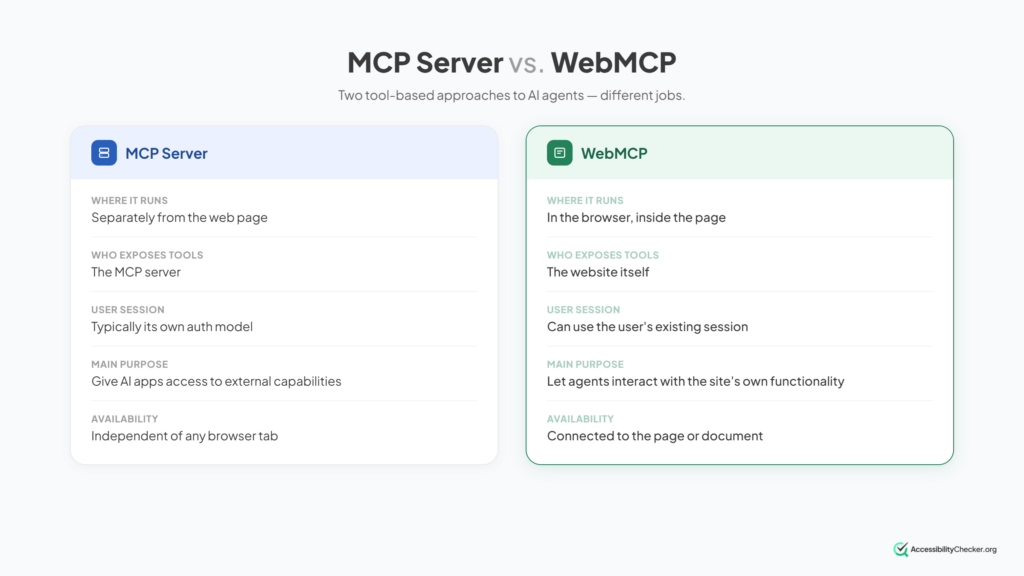
The two can also complement each other.
Imagine an AI shopping assistant.
An MCP server might provide broad access to a retailer’s product data.
WebMCP could then help the agent interact with the checkout the user currently has open.
Different jobs.
Similar tool-based philosophy.
Is WebMCP Secure?
This is where things get interesting.
Giving AI agents structured access to website functionality solves one problem.
It also creates some new ones.
The WebMCP work identifies several security and privacy risks that developers need to think about.
Four are particularly easy to understand.
Risk 1: Tool Poisoning
Remember the tool description?
The AI agent reads it to understand what a tool does.
That means the description itself becomes something the model has to trust.
A malicious tool could present a legitimate-sounding description alongside instructions designed to manipulate the agent.
Nothing needs to “hack” the agent in the traditional sense.
The problem is that language is both data and instruction to a language model.
Risk 2: Output Injection
The same problem can appear in the other direction.
Suppose a tool retrieves posts from a forum.
One of those posts contains text written specifically to manipulate an AI agent.
The website retrieves the post.
The tool returns it.
The agent reads it.
Suddenly, untrusted user-generated content is sitting inside the information the agent is using to make decisions.
Risk 3: Misrepresentation of Intent
Imagine a tool called:
finalizeCart
Its description says:
“Finalizes the current shopping cart.”
What does “finalizes” mean?
Prepare the cart for review?
Calculate the final price?
Or actually charge the user’s card?
The name and description might make one action sound harmless while the function performs something consequential.
That’s a serious problem when an AI system is deciding whether to call the tool on someone’s behalf.
Risk 4: Over-Parameterization
This one is subtler.
Imagine a shopping tool asks for:
size
maxPrice
Fair enough.
Now imagine it also asks for:
age
location
height
skinTone
previousPurchases
An AI assistant may already know some of those things about its user.
And because the tool asks for them, the agent may try to help by supplying them.
The website has potentially acquired personal information that the person never consciously typed into that site.
That’s why the information tools request matters just as much as the actions they perform.
And not every security question has been resolved.
Can You Actually Use WebMCP Today?
Yes.
But with a very large asterisk.
As of September 2026, WebMCP is available through an origin trial in Chrome covering versions 149 through 156. Microsoft Edge is running its own origin trial from Edge 150, which expires on 17 November 2026.
Chrome describes origin trials as temporary programmes that let developers test experimental web-platform features on real websites before a decision is made about wider availability.
In other words:
An origin trial is not the same thing as normal browser support.
For local development, Chrome also provides a WebMCP testing flag.
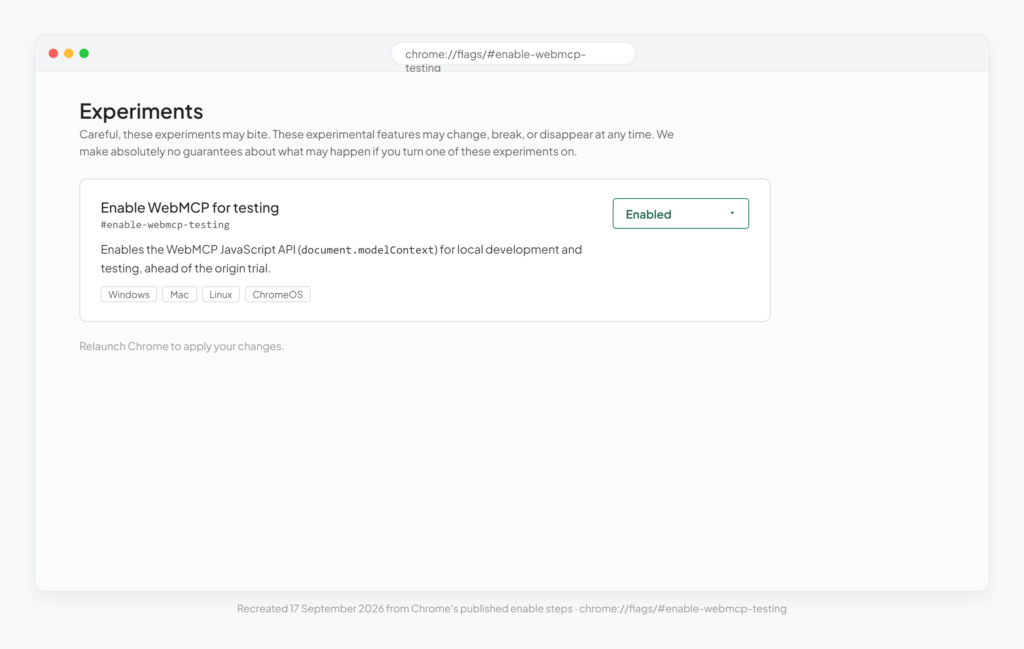
For a live website participating in the Chrome trial, the site needs to register for the origin trial and provide the appropriate token.
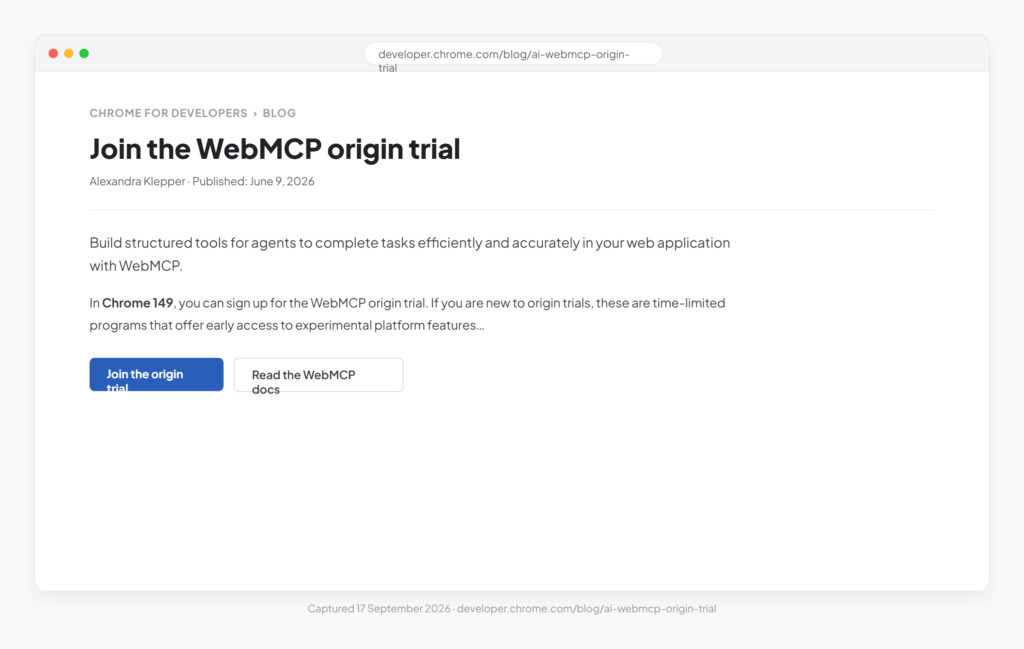
What happens after that window closes hasn’t been announced.
Some analysts expect stable-channel enablement around late 2026, which is roughly when the trial ends. But that’s a projection, not a commitment, and no shipping milestone has been confirmed.
That’s what trials are for.
The API can change.
Feedback can change the design.
Security issues can change the design.
Cross-browser support is a separate question.
Firefox and Safari participate in the specification discussions but haven’t committed to implementing it.
One warning if you’re researching this yourself: a number of articles claim Microsoft Edge 147 shipped native WebMCP support. At least one publisher has since retracted that, noting it doesn’t appear in Microsoft’s official Edge 147 release notes. Edge’s involvement is an origin trial, not native support.
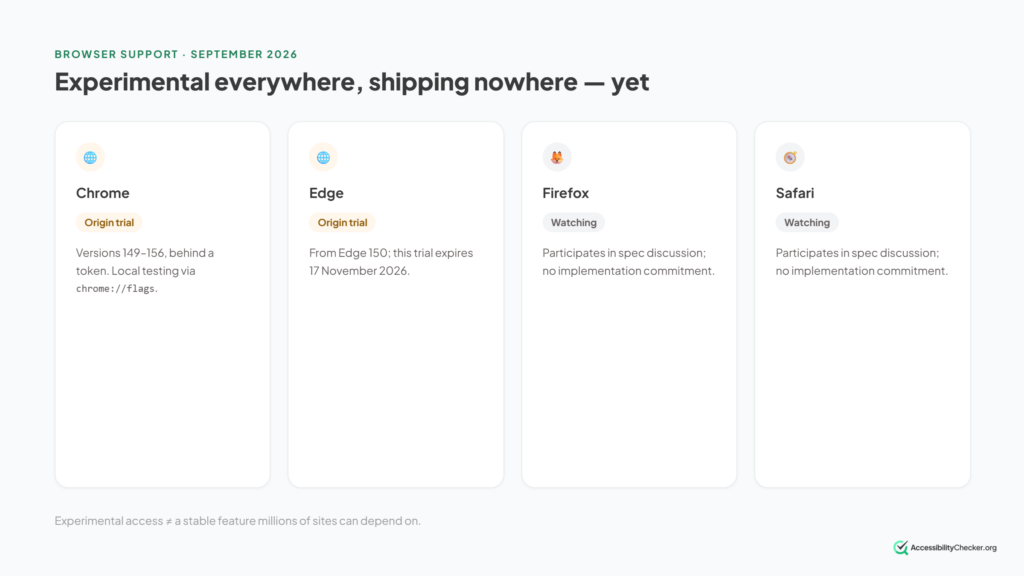
So if somebody tells you:
“WebMCP is now supported by browsers.”
Ask what they mean by supported.
There is a significant difference between:
experimental access
and:
a stable feature millions of websites can safely depend on.
WebMCP is still much closer to the first.
Be Careful With Older WebMCP Tutorials
If you’ve already searched for WebMCP implementation guides, you may have noticed something frustrating.
They don’t all use the same API, and that’s because WebMCP has been changing quickly.
One particularly important change is where the API lives.
Older examples may show:
Current implementations use:
That isn’t a cosmetic change.
It reflects the idea that WebMCP tools belong to a particular document rather than to the browser’s broader Navigator object.
Other pieces of the API have changed during development too.
The practical lesson is simple:
Check the date on any WebMCP tutorial before copying its code.
An article that’s only a few months old can already contain obsolete implementation details.
This article will inevitably age too, which is why we’ve dated browser-support and API-specific information wherever it matters.
What Happened When People Actually Shipped WebMCP?
Specifications tell you how something is supposed to work.
Real websites tell you what happens when it meets reality.
And there aren’t many production WebMCP case studies yet.
That makes the ones that do exist particularly interesting.
A ChatGPT Agent Found Bugs in One Implementation
Orshot documented implementing WebMCP and exposing 22 tools.
The interesting part wasn’t simply that the tools worked.
According to its implementation write-up, a ChatGPT agent subsequently used the site, audited the WebMCP implementation and identified bugs that were then fixed.
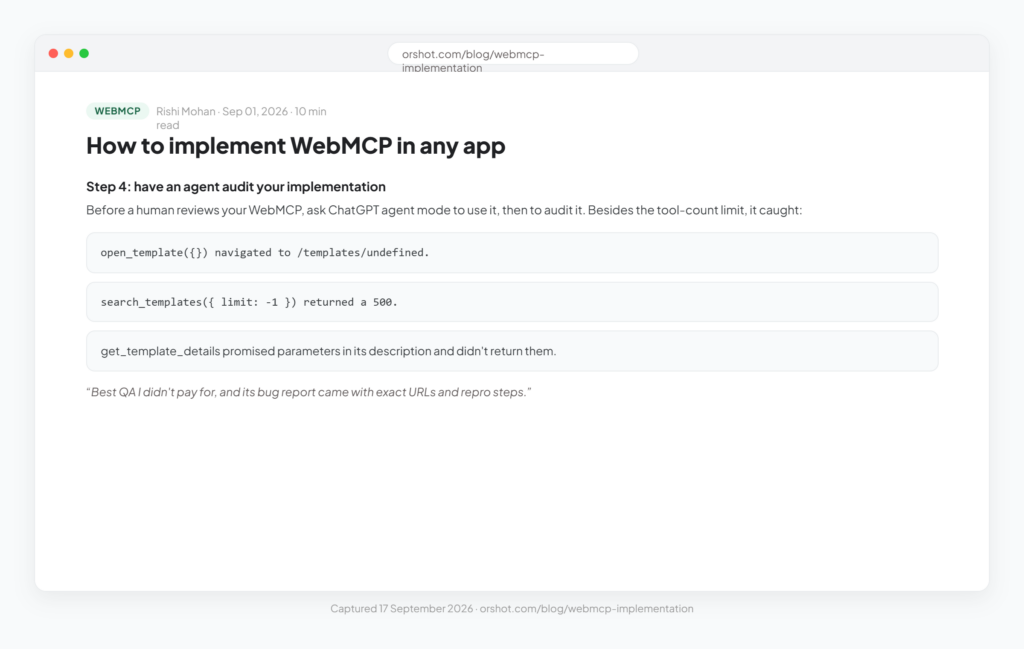
That’s an interesting glimpse of where this could go.
The agent isn’t simply consuming the interface.
It’s capable of interacting with the structured functionality deeply enough to reveal problems in how that functionality has been exposed.
Ordinary Website Features Can Quietly Get in the Way
Other early implementation experiences point to a less glamorous problem.
Websites contain years of design decisions made on the assumption that the thing using them is human.
Anti-spam mechanisms are one example.
Custom controls are another.
A honeypot field deliberately catches software that behaves differently from a normal user.
That’s useful when the software is a spam bot.
Less useful when it’s an authorized AI agent trying to submit a form for the user.
Likewise, a custom dropdown may look perfectly normal on screen while exposing very little useful structure to automation.
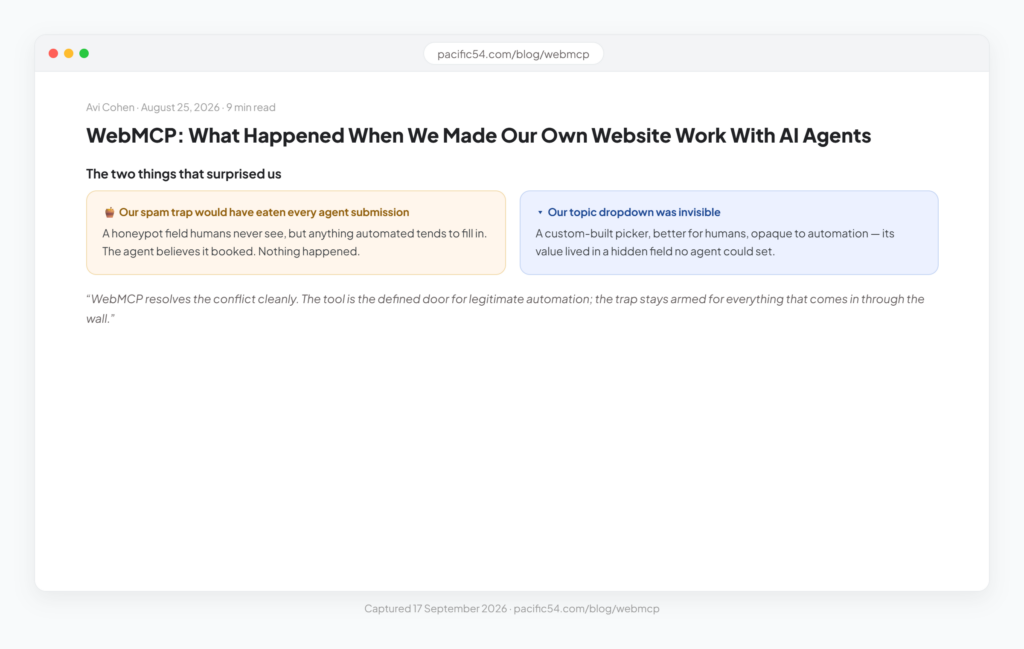
This may become one of the bigger lessons of the agentic web.
Making a website usable by agents isn’t necessarily just about adding agent technology.
Sometimes it’s about finding the existing parts of the website that software can’t reliably understand or operate.
WebMCP and Accessibility Have an Interesting Overlap
This is where WebMCP gets particularly interesting to us.
AI agents and assistive technologies are not the same thing.
But they repeatedly encounter a similar underlying problem:
Websites often communicate meaning visually without communicating it programmatically.
A human sees:
“That’s a dropdown.”
Software may see:
“That’s a collection of nested <div> elements with click handlers.”
A human sees that text next to a box as its label.
Software needs the relationship between that label and the control to be represented in the page.
Accessibility has been dealing with this problem for years.
Semantic HTML, properly associated labels, native controls, meaningful names, predictable states and programmatic relationships all help assistive technologies understand an interface.
Many of those same foundations can also make a website easier for software agents to interpret.
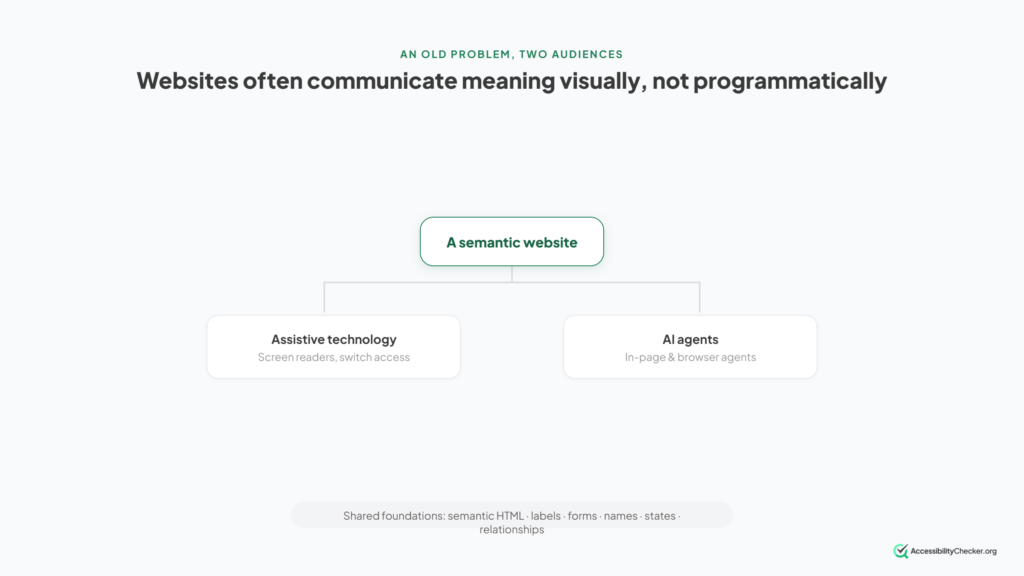
The WebMCP project has an explicit accessibility goal. One of its stated design aims is to give assistive technologies a standardized route to web application functionality, beyond what traditional accessibility trees provide.
But the mechanism matters, and it’s easy to describe incorrectly.
WebMCP is not designed to be consumed directly by assistive technology, and it isn’t intended to interact with the page’s accessibility tree. The project is explicit about this. Its role is to let agents act as capable intermediaries.
So the accurate version isn’t:
“WebMCP will feed your screen reader.”
It’s closer to:
“WebMCP gives an AI agent a more reliable way to complete a task on a person’s behalf.”
The formal accessibility work is also underway rather than finished. Issue #65, opened in January 2026, sets out the starting goals: reviewing existing use cases through an accessibility lens, developing new use cases for people with disabilities, and beginning formal accessibility documentation in the specification.
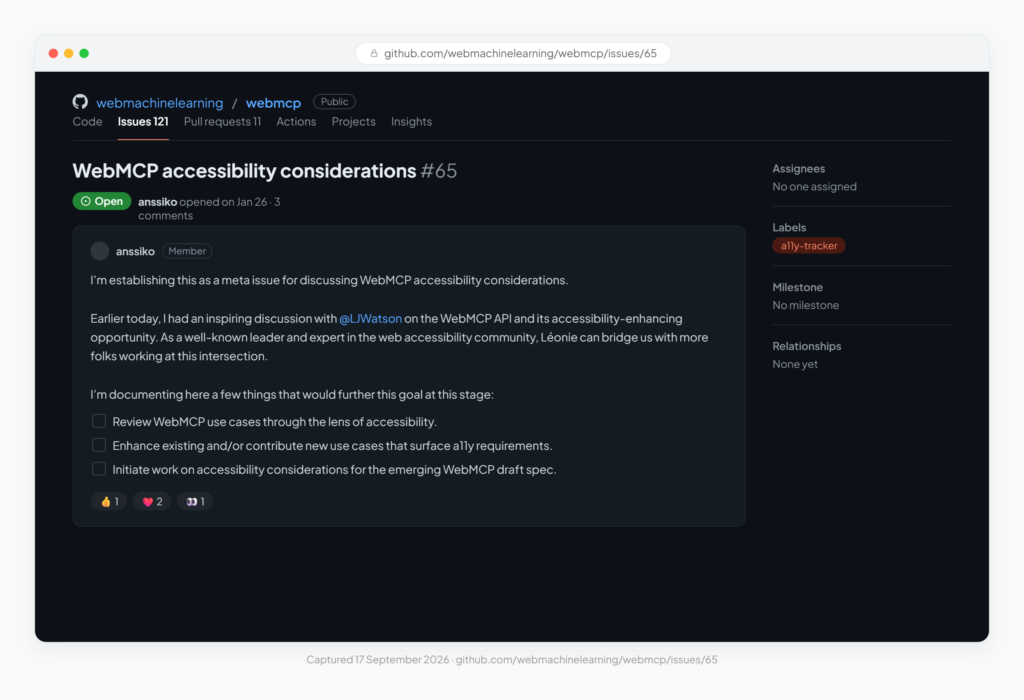
This creates an important distinction.
An accessible website is not automatically a WebMCP-enabled website.
And adding WebMCP does not automatically make a website accessible.
But both expose a deeper principle:
The more meaning a website exposes programmatically, the less software has to guess from its visual appearance.
That’s useful for a screen reader.
It’s useful for browser automation.
And increasingly, it’s useful for AI agents.
Does WebMCP Help SEO?
Not directly.
And this is an important distinction because WebMCP is sometimes discussed alongside AI search optimization, GEO, AEO and other emerging approaches to making websites more visible to AI systems.
WebMCP solves a different problem.
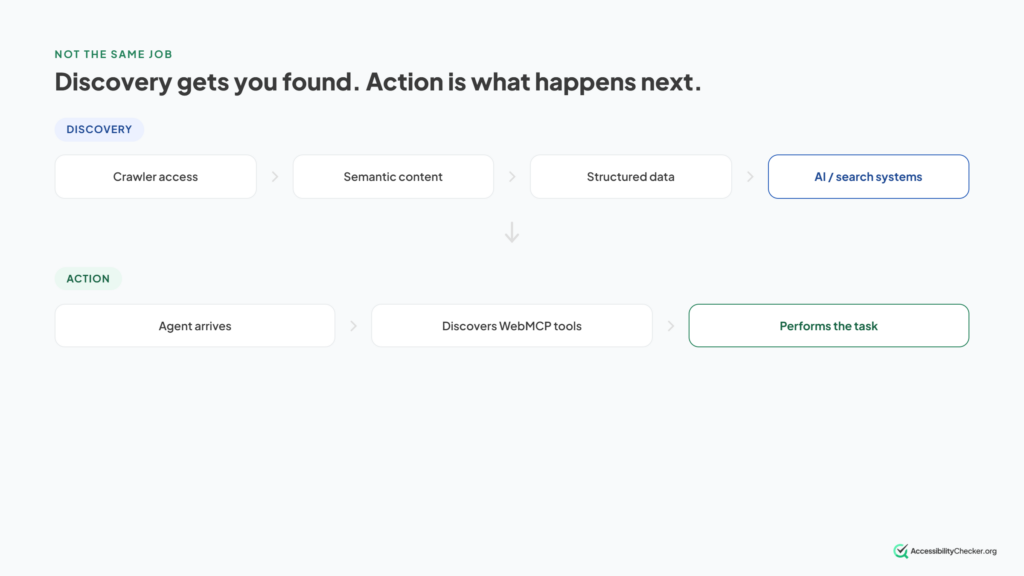
Think about an AI agent’s relationship with your website as two broad stages:
Discovery: How does the AI system find and understand your content?
Action: What can the AI system do once it’s interacting with your website?
WebMCP sits primarily in the second category.
WebMCP doesn’t inherently make a page rank higher in Google.
It doesn’t automatically make ChatGPT cite your article.
It doesn’t give an AI crawler new content to index simply because you’ve registered a tool after the page loads.
Its job is different.
It gives agents a structured way to act once they’re in a position to interact with the website.
That’s why a site can be extremely easy for an AI system to discover but difficult for an agent to use.
And the reverse can also be true.
You could build a beautifully structured set of agent tools on a website nobody can discover.
The two problems are related.
But they’re not interchangeable.
Should You Implement WebMCP Now?
For most ordinary websites, we wouldn’t treat WebMCP as an essential production infrastructure yet.
It’s too early.
The API has changed significantly during development.
The browser implementation is experimental.
Parts of the proposal are still evolving.
And there are unresolved questions around security, privacy and cross-browser adoption.
But that doesn’t mean website owners should ignore it.
There are several useful things you can do now.
1. Get Your Website’s Semantics Right
This is useful regardless of what happens to WebMCP.
- Use proper forms.
- Associate labels with fields.
- Use native controls where they’re appropriate.
- Represent page structure and relationships properly in HTML instead of recreating everything visually with generic elements and JavaScript.
This is the overlap we covered earlier, turned into a to-do list.
2. Look at Your Anti-Bot Measures
We saw what happened to that honeypot. Now ask the same question about everything else:
Would this block a legitimate agent as well as a malicious bot?
CAPTCHA systems, behavioral checks and rate limits all exist for good reasons
But an agentic web creates a much more complicated distinction between:
“software I want to block”
and:
“software my customer explicitly asked to use my website.”
That problem isn’t going away.
3. Identify the Actions That Actually Matter
Forget WebMCP for a moment.
What do people actually come to your website to do?
- Search products?
- Book an appointment?
- Request a quote?
- Check an order?
- Submit a form?
- Compare options?
- Change a reservation?
Those actions are much more useful starting points than asking:
“Which pages should we make AI-friendly?”
Agents care about capabilities.
4. Experiment
If you have development resources, WebMCP is stable enough to experiment with, just not stable enough to depend on.
- Register one read-only tool.
- See how the browser exposes it.
- Let an agent interact with it.
- Try to break it.
An hour spent experimenting with the technology will probably teach you more than an hour spent reading predictions about the “agentic web”.
Just don’t build your entire website strategy around it yet.
Can Website Scanners Actually Detect WebMCP?
This is a surprisingly important question.
Imagine a website registers all its WebMCP tools using JavaScript.
Then imagine a scanner downloading the site’s raw HTML and looking for evidence of WebMCP.
What does it find? Potentially nothing.
The tools don’t necessarily exist in the original HTML.
They’re registered when the JavaScript runs.
That means a static website scanner can report:
“No WebMCP tools detected.”
while a browser running the page can see and use multiple tools.
This isn’t hypothetical.
Orshot documented receiving an AI-readiness score of 28/100 from an HTML-level checker that reported no WebMCP integration on a site where a ChatGPT agent was actively using 22 WebMCP tools.
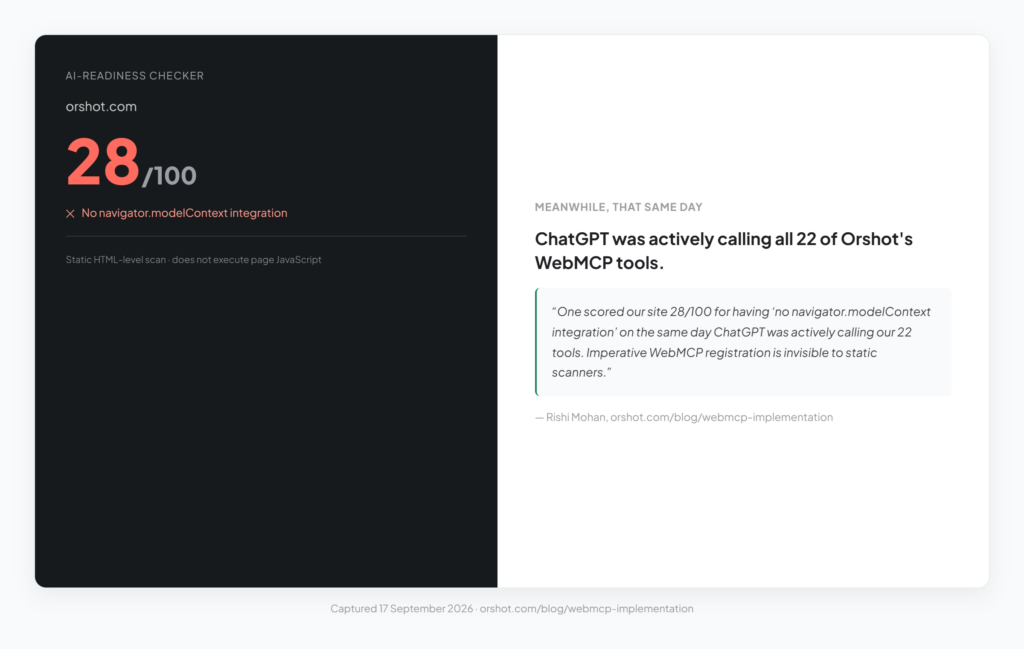
Neither observation is necessarily contradictory.
They’re looking at different things.
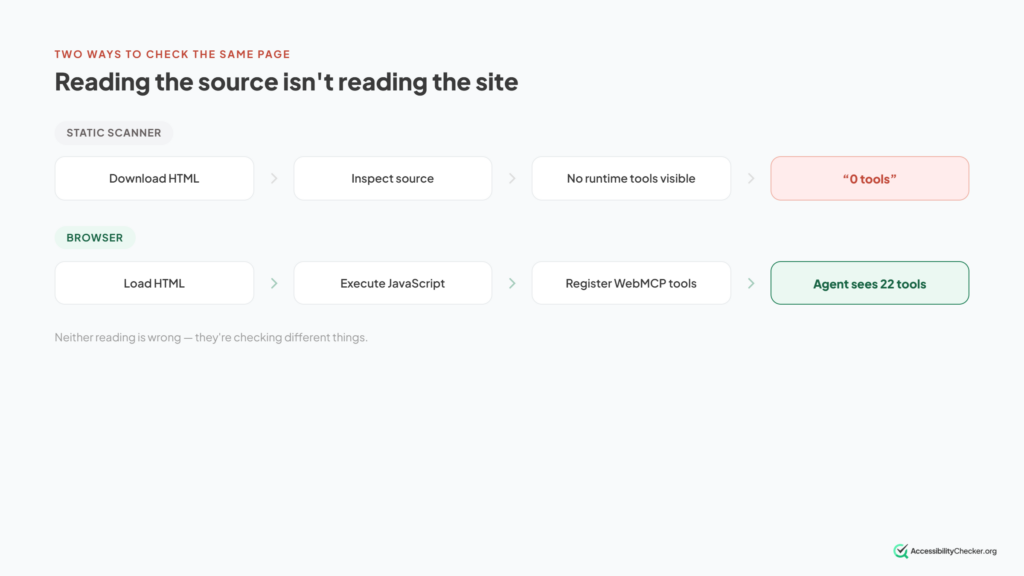
This distinction is going to matter increasingly as website testing moves beyond static source code.
Some characteristics can be detected by fetching a page.
Others only exist after the page has loaded, scripts have executed, permissions have been evaluated and the browser has created the final interactive environment.
So if a tool claims to check whether a website supports WebMCP, ask one question:
Is it testing the source code, or the website that actually runs in the browser?
Those aren’t always the same thing.
The Bottom Line on WebMCP
WebMCP is a good idea that isn’t finished.
The problem it addresses is real.
Having increasingly sophisticated AI agents operate websites by interpreting screenshots, hunting for controls and simulating mouse clicks is an awkward architecture.
WebMCP proposes something much cleaner:
Let the website tell the agent what it can do.
- Give those actions names.
- Describe them.
- Define the information they require.
- Let the agent call them directly.
The concept is simple, but building it safely across the open web is not.
As of September 2026, WebMCP remains experimental. Chrome and Edge are testing it through origin trials, the API has continued to evolve, browser adoption is not settled and important security and accessibility questions remain open.
So you probably don’t need to rush out and rebuild your production website around WebMCP today.
But ignoring it entirely would also miss the bigger change taking place.
AI agents aren’t just reading the web anymore.
They’re beginning to use it.
And if that continues, websites will need better ways to communicate not only what they say, but what they can do.
WebMCP is one of the clearest attempts yet to build that layer.