Mastering SEO Alt Text: Improve Your Accessibility and Search Visibility



Alt text helps SEO by giving search engines textual context for images, which can improve image search rankings and reinforce a page’s topical relevance, but it should be written primarily for accessibility, in under 125 characters, without keyword stuffing.
To help you make the most of your efforts, we’ve unpacked the effects SEO alt text can have and the steps you can take to get the best of both worlds: web accessibility compliance and greater search visibility.
Quick Facts
- Recommended alt text length is 5–15 words, or under 125 characters.
- Across a study of 800+ websites, 73.4% saw increased organic traffic after accessibility improvements, with an average 12% traffic uplift within three months.
- WCAG 2.2 requires alt text for non-text content at Level A, the minimum compliance tier.
- Decorative images should use an empty alt attribute (
alt=""), not be left with no alt attribute at all. - Alt text is read aloud by screen readers; the title attribute, by contrast, only appears as a hover tooltip and isn’t a ranking signal.
- What Is SEO Alt Text?
- Can Alt Text Really Help SEO?
- How to Write Alt Text for SEO: Essential Best Practices
- What Common Alt Text Mistakes Should You Avoid?
- How Should You Write Alt Text for Product Images? (Guidance for eCommerce Stores)
- The Synergy Between Alt Text and Web Accessibility
- How to Audit Alt Text On Your Site
- Advanced Alt Text Considerations
What Is SEO Alt Text?
TL;DR: Alt text (alternative text) is a short description added to an image’s HTML. It helps people using screen readers understand images and gives search engines important context about what an image shows. However, well-written SEO alt text can also help images appear in search results and support your page’s overall SEO strategy by reinforcing the topic of your content.
Alt text, short for “alternative text,” is a brief description added to the HTML of an image on your website. It is designed to communicate the content or purpose of an image when the image itself cannot be viewed or interpreted directly.
Basically, rather than relying solely on an image to convey information, alt text uses words to explain what the image depicts, such as a a product photo, a chart, a team member headshot, or a decorative graphic that supports the surrounding content.
Alt text is typically added through a website’s content management system, such as WordPress, and is stored within the image’s HTML. Visitors browsing your site may never see it, but it remains an important piece of information that helps various technologies understand the image and its relationship to the page.
For example, instead of leaving an image without a description, a website selling running shoes might use alt text such as “blue trail running shoes on a rocky hiking path.” Likewise, a blog about digital marketing might use alt text like “SEO specialist reviewing website analytics on a laptop.” In both cases, the alt text provides a clear explanation of the image’s content in a concise and natural way.
We also recommend reading about how alt text fits in with the bigger digital accessibility picture here.
Can Alt Text Really Help SEO?
Yes. While alt text is primarily intended to describe images, it can also support your SEO efforts by helping search engines better understand your visual content and its relationship to the page.
In our latest SEO study, we found a strong connection between accessibility improvements and organic search performance. Analyzing 800+ websites revealed that 73.4% experienced an increase in organic traffic after implementing accessibility improvements, with the average site seeing a 12% uplift in traffic within three months.
Since alt text is one of the most fundamental accessibility elements, it forms an important part of that broader SEO picture.
Alt Text Helps Search Engines Understand Images
Search engines have become increasingly sophisticated at interpreting visual content, but they still rely on textual signals to understand exactly what an image depicts. Alt text provides this context, allowing search engine crawlers to accurately index images and understand how they relate to the surrounding content.
For example, an image with the alt text “SEO specialist analysing website performance metrics” provides far more context than a generic file name such as “IMG_5678.jpg”. This additional information helps search engines determine the relevance of both the image and the page it appears on.
When your images reinforce the topic of the content, descriptive alt text can strengthen the semantic relevance of the page as a whole.
Alt Text Supports Search Rankings
Alt text is not a magic ranking factor that will instantly move a page to the top of Google. However, it contributes to several signals that search engines use to evaluate content quality and relevance.
Google has long recommended using descriptive alt text to help it understand images, and it remains an important ranking signal for image search results. Well-written alt text can also reinforce the subject matter of a page, helping search engines build a clearer understanding of your content.
This is particularly important when considered alongside broader accessibility efforts.
Alt Text Can Drive Additional Traffic Through Image Search
Google Images and visual search tools such as Google Lens have become valuable sources of organic traffic. When images are properly labelled with descriptive alt text, search engines can more confidently match them to relevant user searches.
This creates additional opportunities for your content to be discovered, especially if your website relies heavily on visual assets. E-commerce stores, recipe websites, travel blogs, design portfolios, and how-to guides can all benefit from increased visibility in image search results.
By helping search engines understand what your images show, alt text gives your visual content a better chance of appearing in front of potential visitors who may never have discovered your website through traditional search results alone.
Alt Text Works Best as Part of a Larger SEO Strategy
Although alt text is valuable, it should be viewed as one component of a broader SEO and accessibility strategy. High-quality content, strong page structure, fast loading times, internal linking, and a positive user experience all remain important ranking factors.
Think of alt text as an opportunity to provide additional context rather than simply another place to insert keywords. When written naturally and accurately, it helps search engines understand your content, improves image visibility, and contributes to the accessibility signals that are increasingly associated with stronger organic search performance.
How to Write Alt Text for SEO: Essential Best Practices
Crafting effective alt tags for SEO isn’t complicated, but there are a few key rules to follow if you want to get it right for both SEO and accessibility.
Rule #1: Be Descriptive and Specific
Describe what’s actually in the image using clear, specific language. Think about what someone would need to know if they couldn’t see the image. Instead of saying “dog,” say “golden retriever puppy playing with a tennis ball in the grass.” The more accurate the description, the more useful it is for both users and search engines.
Rule #2: Keep it Concise
Alt text should be brief but informative. Aim for around 5–15 words or under 125 characters. This keeps the description short enough for screen readers, while still providing enough detail to be meaningful. Avoid cramming in too much information or turning alt text into a full sentence unless it adds clarity.
Rule #3: Use Keywords Naturally
Incorporate relevant keywords when they make sense, but don’t force them in. Keyword stuffing, like repeating the same phrase unnaturally, can hurt the user experience and you may be penalized by search engines. Focus on writing for humans first, search engines second.
Rule #4: Provide Context
Think about why the image is on the page and how it connects to the surrounding text. Your alt tags should reflect the image’s purpose in context. For example, if the image supports a blog about DIY gardening, describe what the image shows in a way that supports that narrative—e.g., “woman planting herbs in a raised garden bed.”
What Common Alt Text Mistakes Should You Avoid?
Even with the best intentions, it’s easy to make mistakes when writing alt text, especially if you’re trying to optimize for both accessibility and SEO. Here are some of the most common pitfalls to watch out for:
- Leaving Alt Text Blank. Unless the image is decorative and intentionally marked with alt=””, skipping alt text can make your site less accessible and leave gaps in content understanding for screen reader users.
- Keyword Stuffing. Cramming multiple keywords into the alt attribute makes the text unreadable and you may be penalized by search engines. Keep it natural and relevant.
- Using “Image of…” or “Picture of…”. Screen readers already announce that it’s an image, so phrases like “image of a flower” are redundant. Instead, simply write “red tulip blooming in spring garden.”
- Being Too Vague or Too Long. Alt text like “photo” or “nice view” provides no real value. On the flip side, overly wordy descriptions can overwhelm screen reader users. Aim for a specific, concise summary that fits within 125 characters.
How Should You Write Alt Text for Product Images? (Guidance for eCommerce Stores)
For eCommerce websites, alt text serves a slightly different purpose than it does for blog posts or informational content. Rather than simply describing an image, product image alt text should help both users and search engines understand exactly what is being sold.
The best product image alt text is clear, specific, and focused on the details that distinguish the product from similar items. This may include the product type, color, material, size, style, or any defining features visible in the image.
For example, instead of using generic alt text such as: “Watch”
A more descriptive alternative would be: “Men’s stainless steel chronograph watch with blue dial and silver bracelet”
This approach provides meaningful context while helping search engines understand what the image depicts.
Describe What Is Visible
When writing alt text for product images, focus on what a customer can actually see. Include key visual details that may influence a purchasing decision, such as:
- Color
- Material
- Pattern or texture
- Style or design features
- Product variant shown in the image
For example:
Good: “Green velvet three-seater sofa with wooden legs”*
Good: “Rose gold diamond engagement ring with oval centre stone”
Avoid Keyword Stuffing
It can be tempting to fill alt text with target keywords, particularly on category and product pages. However, alt text should read naturally and accurately describe the image.
For example:
Poor: “Women’s running shoes running trainers sports shoes lightweight running footwear”*
Better: “Women’s lightweight blue running shoes with white sole”
Search engines are sophisticated enough to understand context, so prioritize clarity over keyword repetition.
Different Images Should Have Different Alt Text
Many product pages contain multiple images showing different angles, colors, or features. Avoid using the same alt text for every image.
Instead, describe what makes each image unique:
- “Black leather handbag front view”
- “Black leather handbag side profile”
- “Black leather handbag interior compartment”
- “Black leather handbag adjustable shoulder strap detail”
This provides more useful information for users while giving search engines a better understanding of the product.
Don’t Forget Lifestyle Images
Many online stores use lifestyle photography to help customers visualise products in real-world settings. These images also benefit from descriptive alt text.
For example:
Product image: “Oak dining table with black metal legs”
Lifestyle image: “Family seated around oak dining table in modern kitchen”
This helps search engines understand the broader context of the image while improving accessibility for users.
The Synergy Between Alt Text and Web Accessibility
Alt text doesn’t just support SEO, it also helps create a more inclusive web. When written with accessibility in mind, alt text enhances the online experience for users with visual impairments while also improving your site’s overall usability and structure.
Helping Screen Readers Do a Better Job
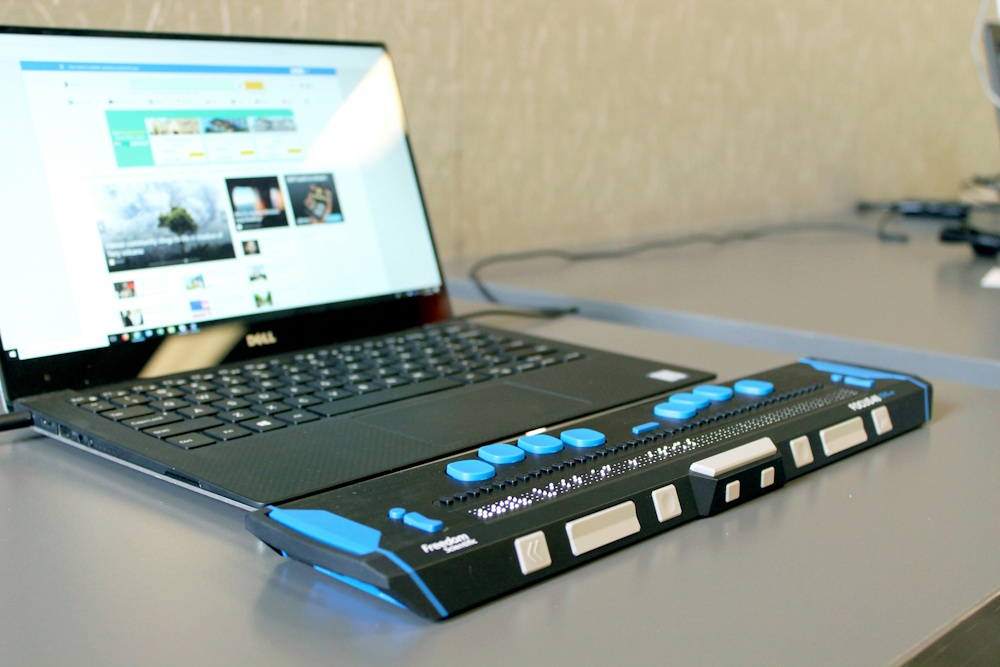
Screen readers rely on alt text to communicate the content of images to users who are blind or have low vision.
When an image is encountered, the screen reader reads the alt attribute aloud, allowing the user to understand the image’s purpose or content. Well-written alt text ensures that visual elements don’t create gaps in comprehension for those navigating a site without vision.
Creating a Human-First Experience
Great alt text prioritizes clarity, context, and user experience, all of which align with what search engines reward.
Writing image alt tags for people, not algorithms, leads to more natural phrasing, stronger relevance, and better comprehension. When you write with accessibility in mind, you’re inherently improving your SEO by making your content easier to understand and navigate.
Complying with WCAG Guidelines
The Web Content Accessibility Guidelines (WCAG), a global standard for web accessibility, emphasize the importance of alternative text.
Under WCAG 2.2, providing alt text for non-text content is a Level A requirement, which is the minimum level of accessibility compliance. Sites aiming for AA or AAA compliance must ensure all meaningful images are described and decorative ones are properly marked with null alt text.

How to Audit Alt Text On Your Site
Regularly auditing your site’s alt text is essential for maintaining both accessibility and SEO performance. To make things easier, here are some tools and techniques to help you evaluate and improve your alt text usage:
- ACE™ Scanner. ACE™ Scanner by AccessibilityChecker.org can scan your web pages for accessibility issues, including missing or poorly structured alt text. It provides a clear breakdown of what’s wrong and where, making it easier to prioritize fixes and improve compliance with WCAG standards. SmartFix™ can also be used to automate this process.
- WAVE. Offered by WebAIM, the WAVE tool highlights images with missing, empty, or suspicious alt attributes directly on your web page so you can spot gaps instantly.
- Lighthouse in Chrome DevTools. Google’s built-in auditing tool (found under the “Lighthouse” tab in DevTools) provides an accessibility score for your page and flags images without alt text.
- Manual Review with Screen Reader Tools. For a human-centered perspective, try navigating your site using a screen reader like NVDA (Windows) or VoiceOver (Mac). This can reveal how useful or frustrating your alt text is in practice.
- ACE™ Dashboard. ACE™ DashboardOnce fixes are made, the lets you track alt text coverage and other accessibility issues over time, rather than re-auditing from scratch.
Advanced Alt Text Considerations
Once you’ve mastered the basics of writing effective alt text, there are more nuanced situations to consider.
Alt Text for Complex Images
For images that convey dense or layered information, like charts, graphs, or infographics, standard alt text alone may not be enough. These visuals often require:
- Concise alt text that identifies the type of graphic and its purpose (e.g., “Bar chart showing 2024 monthly sales by region”).
- A longer description in the surrounding text, a linked page, or using ARIA longdesc attributes to explain the full data set or insights.
- Data tables as alternatives, when appropriate, to ensure the same information is accessible in a screen-readable format.
The goal is to ensure users who can’t see the image can still fully understand the information it presents.
Alt Text vs. Image Titles vs. Captions
Alt text often gets confused with image titles and captions, but each serves a different role:
- Alt Text: Invisible to sighted users, read by screen readers and used by search engines.
- Title Attribute: Optional metadata that appears as a tooltip when a user hovers over an image. Not consistently supported by all browsers or screen readers.
- Captions: Visible text near the image that describes or contextualizes it for all users. Captions are great for storytelling or additional context but don’t replace alt text.
Best practice: Always use alt text for accessibility and SEO, and only use titles and captions when they serve a clear purpose.
The Role of AI in Generating Alt Text
AI-based tools can automatically generate alt text based on image recognition, which is helpful for large websites or content libraries. However, there are key trade-offs:
Pros:
- Speeds up the process of labeling large volumes of images.
- Useful for content creators with limited accessibility knowledge.
- Can catch missing alt text across a site.
Cons:
- Descriptions can be vague, generic, or inaccurate (e.g., “a person” instead of “a nurse assisting a patient”).
- AI often lacks context, especially for branded content or emotional nuance.
- Still requires a human review to meet accessibility and SEO standards.
AI can be a helpful assistant, but it shouldn’t replace thoughtful, human-written alt text, especially for meaningful or complex images.
In Closing
Adding alt text to your images is just one part of providing a more user-friendly experience on your site or app and complying with web accessibility standards, but it has great importance. And, in the bigger scheme of things, it can also help drive more traffic to your site, if implemented correctly, that is.
FAQs
Does alt text help SEO?
Yes. Alt text helps Google understand image content and is a ranking signal for image search.
How long should SEO alt text be?
Under 125 characters for accessibility. Length isn't a direct ranking factor; clarity is.
Should I include keywords in alt text?
Naturally, yes. Avoid stuffing. Describe the image accurately first; if the keyword fits, include it.
What's the difference between alt text and image title?
Alt text is for accessibility and SEO (read by screen readers). Image title shows on hover and isn't a ranking signal.
Do all images need alt text?
Functional and informative ones, yes. Decorative images should have empty alt.